AI in Education: What School Leaders Need to Do This Year

On July 21, 2025, the U.S. Department of Education published a Proposed Priority and Definitions—Secretary’s Supplemental Priority and Definitions on Advancing Artificial Intelligence in Education (Docket ID ED‑2025‑OS‑0118, FR Doc 2025‑13650, 90 FR 34203–34206)1 for a 30‑day public comment period a proposed priority that could shape the next decade of learning: Advancing Artificial Intelligence in Education. It’s not just a funding move—it’s a signal. A signal that the future of education is now, and it will be influenced, shaped, and redefined by AI.

What should school leaders do this year to prepare?

This is bigger than adopting a tool or adding an AI training to your PD calendar. Forward thinking leaders will use this year strategically to ensure all staff build awareness and confidence around AI, what it is, how it’s showing up in education, and how to integrate it thoughtfully into teaching and learning. It’s not about turning everyone into AI experts, it’s about making sure no one is left out of the conversation.

Why This Matters Now

We are no longer at the beginning of the AI conversation. We’re at the inflection point.
The Department’s proposed definition of AI literacy sets a powerful foundation:
“The technical knowledge, durable skills, and future-ready attitudes required to thrive in a world influenced by AI. It enables learners to engage, create with, manage, and design AI, while critically evaluating its benefits, risks, and implications.”

AI literacy isn’t just for coders or tech electives. It’s for every student. And every educator needs to be ready to help students meet that challenge.

Key Priorities for Leaders to Focus On This Year

Let’s cut through the 1,000-foot policy language and get specific about what this means for school and district leaders.

Here are three priorities to focus on right now:

Priority 1:  Invest in Educator Learning First

Before we ask teachers to teach about AI or integrate AI into their classrooms, we need to start by investing in their confidence and understanding.

This includes:

  • Professional learning that explains how AI works (and where it doesn’t)
  • Opportunities to explore ethical questions around AI in instruction and student use
  • Support for integrating AI into their own workflows—lesson planning, assessment, communication

This school year is the time to start building lasting capacity—not just offering one-off training.
Ask yourself: Do your teachers have the language, space, and tools to talk about AI with their students confidently?

Priority 2:  Infuse AI Literacy Across the Curriculum

AI should not live in a single elective or tech department. It should show up in social studies, where students analyze bias in algorithmic decision-making. In English, where they learn to spot AI-generated misinformation. In science, where students explore data, pattern recognition, and models.

This year, challenge your team to:

  • Identify natural crossovers between current curriculum and AI concepts
  • Pilot AI literacy units that connect to real-world issues
  • Talk about AI as a human issue, not just a technical one

Priority 3: Leverage AI to Support Learning and Innovation

There’s a lot of hype around AI tools. Some of it’s legit. Some of it’s smoke and mirrors.
But here’s the part we should pay attention to:

  • How might AI help us address the long-standing challenges that have nothing to do with technology?
  • Can AI help us personalize learning in ways that support students with disabilities or multilingual learners?
  • Can it free up time for teachers by handling repetitive admin tasks?
  • Can we use AI to offer high-quality tutoring or college and career guidance in schools that have never had access before?

Where to Start (Even If You’re Not “Ready”)

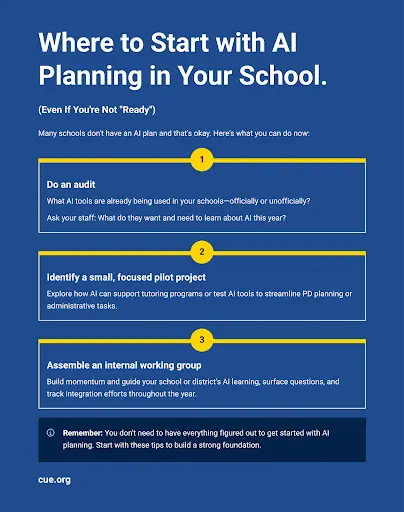
Many schools don’t have an AI plan and that’s okay. Here’s what you can do now:

  • Do an audit: What AI tools are already being used in your schools—officially or unofficially?
  • Ask your staff: What do they want and need to learn about AI this year?
  • Identify a small, focused pilot project (AI in tutoring? PD workflow? Student media literacy unit?)
  • Assemble an internal working group to keep the conversation moving—and build momentum.

You don’t need a finished plan to make progress—these early actions help build staff awareness, build momentum toward AI literacy, and create a strong foundation for future planning.

What This Priority Could Mean for Funding & Strategy

This new federal priority lays the groundwork for future funding opportunities that will reward the districts already doing the work. That means this year’s efforts can double as strategy and grant prep.

Use this year to:

  • Document your teacher training efforts
  • Design programs that align with the proposed categories (dual enrollment, certifications, teacher prep, etc.)
  • Gather evidence of what’s working—those data points will matter when the next round of funding opens up

This new proposed priority from the U.S. Department of Education gives school leaders an opportunity to take a thoughtful, proactive approach to AI without rushing, overhauling everything, or getting lost in the buzz. You don’t need your staff to be an AI experts, you need to be clear about your goals for teaching and learning, and willing to ask how AI fits into that vision.

Start small and use the ideas in this post to:

  • Ground your team in a shared understanding of what AI literacy means.
  • Build confidence and clarity through targeted professional learning.
  • Create safe spaces for teachers to experiment, reflect, and collaborate.
  • Center your decisions on what’s best for students, not just what’s trending.

AI is already part of our world and school leadership isn’t about having all the answers—it’s about asking the right questions, bringing your educators into the conversation, and making intentional moves.

The U.S. Department of Education’s proposed priority offers a clear invitation for schools to lead this work with purpose and reflection. If you haven’t already, take a moment to review the proposal and consider submitting a comment at this link by selecting ‘public comments’ in the menu bar on the left. Your voice as a school leader matters in shaping how this policy supports the real work happening in classrooms every day.

  1. U.S. Department of Education. Proposed Priority and Definitions—Secretary’s Supplemental Priority and Definitions on Advancing Artificial Intelligence in Education. Federal Register, Vol. 90, No. 139, July 21, 2025, pp. 34203–34206. https://www.federalregister.gov/documents/2025/07/21/2025-13650 ↩︎

When Everything Feels Uncertain, Educator Connection Should Be Non-Negotiable

Across the country, educators are navigating growing complexity—rising student needs, shifting expectations, and inconsistent support. Recent reporting from Education Week1 highlights these concerns, capturing how stress, burnout, and a loss of connection are keeping teachers up at night. But these aren’t just individual struggles—they’re symptoms of systems not built for the realities of today’s classrooms. And we recognize that for many districts, when resources are stretched thin, even essential supports can feel just out of reach—but listening to educators and elevating their voices can reveal powerful, often untapped, solutions

But amidst the weight of it all, one truth remains clear, 

Educators flourish when they learn from each other.

Just as students learn best through connection and collaboration, teachers do too. The most effective professional learning doesn’t happen in isolation—it grows in community. It’s in the hallway conversations, shared lesson ideas, and moments of collective problem-solving that real transformation begins.

In a time when federal professional development funds are frozen—when budgets are tight, and uncertainty feels constant—we can’t let connection be the first thing we cut.

At CUE, we’ve known this for over 45 years. And we believe more than ever: Community is not a luxury. It’s essential infrastructure and teachers need more than PD, they need each other.

Resourceful Doesn’t Have to Mean Resourced

Yes, the freeze on federal Title II-A funds for teacher development is real, and yes, it impacts districts across the country. But it doesn’t have to mean the end of meaningful support.

Even when budgets are already allocated, creativity within existing structures can open doors. Decision-makers can explore how to braid funds from Title I or IDEA to support collaboration time or instructional coaching. Rural education and school improvement grants may offer flexibility to fund peer mentoring or cross-site networks. And Title IV-A rollover dollars can be leveraged for tech integration projects—especially those rooted in educator-led inquiry and innovation.

Of course, every district’s funding picture looks different—and repurposing dollars requires thoughtful alignment with each program’s goals. But with creative planning and a strong case for impact, there are still pathways forward

Just as importantly, schools can reimagine how time is used—not just how funds are spent.

  • Build in time for structured collaboration during the school day.
  • Support peer mentoring and cross-role coaching.
  • Create shared planning routines that encourage reflection, experimentation, and problem-solving.
  • Recognize the power of informal learning networks, not just formal professional development.

Connection doesn’t require a massive budget. But it does require commitment.

Connection Is a Cornerstone of Learning

A well-supported, connected educator isn’t just more likely to stay—they’re more likely to reflect, innovate, and adapt instruction in ways that meet the moment. When teachers feel seen, heard, and uplifted by their peers, that energy ripples outward. It reaches classrooms and students.

We can’t afford to wait for the perfect funding cycle. We have to lead with what we already know: Investing in educator connection is one of the most powerful, low-cost strategies we have. In times of constraint, we may have to do less overall, but we can protect what matters most.

How CUE Can Help

We know school leaders are balancing enormous pressures—academic recovery, staff burnout, shrinking budgets, and rising expectations. In that landscape, finding time and resources to support professional learning can feel nearly impossible. The choices leaders face aren’t about what’s ideal—they’re about what’s sustainable, impactful, and equitable under real-world conditions.

At CUE, we don’t just believe in educator connection, we build the structures for it. This has always been the place where educators come to connect, learn, and grow—together. We help schools support the people at the heart of the system: educators. 

If you’re a leader looking for ways to support your educators with meaningful, lasting connection, we’d love to talk. CUE membership is one of the simplest ways to keep your team inspired, informed, and part of something bigger. Reach out to explore how you can bring your educators into the CUE community—and lead the kind of change that lasts.

  1. Arianna Prothero & Vanessa Solis. “The Top 10 Things That Keep Teachers Up at Night.” Education Week, November 26, 2024. https://www.edweek.org/teaching-learning/the-top-10-things-that-keep-teachers-up-at-night/2024/11 ↩︎

Support Students’ Mental Health During National Suicide Prevention Month

As educators, we are in a unique position to shape the way our students engage with the world, both physically and digitally. September is National Suicide Prevention Month, and it serves as a powerful reminder to prioritize conversations about mental health, particularly when it comes to our students’ digital lives. The online world is where many kids live out significant portions of their day, from social media to gaming, and we, in partnership with parents and guardians, have a responsibility to help them navigate it safely.

One of the most impactful things we can do is talk to our students about how their digital life affects their mental health. Whether it’s the pressures of social media or the isolation that can come from too much screen time, digital experiences play a huge role in how students feel and process the world around them. We must create safe spaces in our classrooms for students to share their experiences, feelings, and concerns about their online interactions.

National Suicide Prevention Month is a critical time to highlight the resources available, like these Resources for Students and Educators from the National Institute of Mental Health, that help teachers understand mental health challenges and give students the tools they need to cope with big feelings like stress and sadness. Resources like the “Jane the Brain” video series, an interactive Kahoot! Quiz for teen depression, and coloring books can make mental health education more accessible and engaging for students.

Our role as educators extends beyond academic content. By opening up discussions about the intersections between mental health and digital life, we can empower students to manage stress, build resilience, and seek help when needed. This month, let’s commit to those conversations—let’s inspire students to take care of their mental well-being, online and offline.

Beyond the Ice Breaker – 3 Innovative Back-to-School Activities to Build Classroom Community

As the new school year kicks off, we often default to launching Day 1 with traditional ice-breakers that welcome our learners back. While these are valuable and fun, one has to wonder: Could we incorporate getting-to-know-you activities that help us meet our learners in creative and imaginative ways? And can these activities play a part in the larger community-building efforts we have in place?

Here are three engaging activities that go beyond the standard icebreaker, designed to activate TK-12 student interest and foster a vibrant classroom community with both tech-infused and unplugged ideas! 

1. “Getting to Know You” with Adobe Express

Invite students to create a digital story about their 2024-2025 goals and interests using the “All About Me” Template inside Adobe Express. This activity not only invites learners to reflect on their experiences but also hones their digital literacy skills. Encourage them to mix photos, videos, and text to craft a narrative that’s uniquely theirs. By sharing these stories, students will not only learn more about each other but also begin to see the power of creativity in storytelling.

2. Collaborative Game Design with Genially

Transform your classroom into a digital game design studio for a day or two. Group students together and challenge them to design a digital board game that represents their ideal school year, topics they are passionate about right now, or current events that inspire powerful classroom conversation. Genially provides them with basic digital designs as they brainstorm game mechanics, rules, and themes. This activity fosters collaboration, creativity, and strategic thinking. Plus, it offers a playful way to discuss expectations, culture, and goals for the year.

3. Classroom Culture with an Unplugged Canvas

Using large sheets of paper, have students co-create a “Classroom Culture Canvas.” This is a visual representation of what they want their classroom community to be like. Students can add words, symbols, drawings, or photos that represent respect, creativity, inclusivity, and fun. This collaborative vision board not only builds a sense of ownership but also sets the tone for a positive and connected classroom environment.

These activities go beyond traditional ice-breakers, which can often cause anxiety and stress. Instead, they offer meaningful ways to build community and connection from the start. By fostering a welcoming and creative environment, you’re setting the stage for a year of growth, collaboration, and authentic learning experiences. Let’s make this school year the most supportive and engaging yet!

Ready to transform your classroom into a hub of creativity and connection? Don’t settle for the usual icebreakers—ignite your students’ curiosity and build a vibrant community from day one! Whether it’s crafting digital stories, designing collaborative games, or creating a shared vision for your classroom culture, these activities are designed to engage, inspire, and empower your students. Join the conversation—what innovative community-building strategies are you excited to try this year?

Creating Classrooms That Shine with Student-Centered Learning Strategies

Creating a vibrant, student-centered learning environment is a transformative journey filled with excitement and possibility. As we consider how our learning spaces will welcome our learners back to school, let’s embrace the opportunity to reimagine our classrooms with strategies that celebrate and amplify student voice and choice while supporting each unique learner. This Edutopia video, “How to Set Up a Learner-Centered Classroom,” provides practical tips and real-world examples to help you visualize and actualize your ideas. It’s not just about setting up a space; it’s about cultivating a dynamic community where every student feels supported and inspired.

Collaborative Classroom Design

Another innovative strategy is setting up a Calming or Peace Corner—a designated space for students to retreat and self-regulate when they feel overwhelmed. This is also referred to as a Calm Corner, Reflection Station, or Mindfulness Area. Whatever you call it, make sure that this area is a positive, reflective space rather than a punitive one, allowing students to recharge and return to learning with a clear mind.  Read about Incorporating a Calming Corner Into Station Rotations for dozens of ideas to get you started. Bridging Apps even has a list of helpful apps for students to help them regulate and calm down for early elementary, upper elementary, middle school, and high school.

CALIE

Developing a Social Contract

Building a classroom community starts with establishing clear expectations. Instead of imposing rules, work with your students to create a social contract or a set of norms. This process gives them a sense of ownership and accountability. Once the contract is agreed upon and signed off by your students, display it prominently in the classroom as a constant reminder of their shared commitments.

Creating a Calming Corner

Another innovative strategy is setting up a Calming or Peace Corner—a designated space for students to retreat and self-regulate when they feel overwhelmed. This is also referred to as a Calm Corner, Reflection Station, or Mindfulness Area. Whatever you call it, make sure that this area is a positive, reflective space rather than a punitive one, allowing students to recharge and return to learning with a clear mind.  Read about Incorporating a Calming Corner Into Station Rotations for dozens of ideas to get you started. Bridging Apps even has a list of helpful apps for students to help them regulate and calm down for early elementary, upper elementary, middle school, and high school.

Routine Discussions and Active Listening

Integrating daily routines for open discussions can significantly enhance student engagement. Morning meetings, for example, provide a structured opportunity for every Two young students happily engaged in reading together, fostering a learner-centered classroom environment student to voice their thoughts and listen to others. For older students, Socratic Circles can foster deeper conversations and respectful debate, promoting critical thinking and empathy.

CALIE

Empowering Student Voices

Above all, empowering student voices and supporting every student is key to a thriving classroom environment. Sharing the floor with students and encouraging open dialogue helps them feel heard and respected. Whether you plan for this time or allow it to happen organically, we can all benefit from putting energy toward hosting discussion spaces rather than leading them. This approach not only builds their confidence but also strengthens the classroom community.

Implementing these practices can transform your classroom into a dynamic and supportive space where every student thrives. Let’s embark on this journey together, creating classrooms that are not just places of learning, but communities where joy, creativity, and connection flourish.

Empowering Inclusive Learning: Bridging the Digital Divide

Addressing the digital design divide is crucial in today’s educational landscape, where integrating technology in learning environments is not just an enhancement but a necessity for equitable access to quality education. According to the National Educational Technology Plan, this divide represents the gap between educational systems that provide educators with the necessary time, resources, and support to effectively design learning experiences using digital tools and those that do not. 1As the architects of learning, teachers need to identify and advocate for their professional learning preferences and needs. By doing so, they can drive the implementation of Universal Design for Learning (UDL) principles in their schools, ensuring that their professional development reflects diverse learning strengths and needs. This approach supports teachers in their instructional design and models the inclusive, adaptive, and personalized learning environments we aim to create for students. 

To bridge this divide, here are proactive steps educators can take within their school communities:

Initiate Conversations

Start discussions with school leadership about the importance of UDL and the benefits of integrating technology in learning designs to support diverse student needs. Here are some prompts to help initiate conversations about the importance of UDL and technological integration with school leadership:

  • I’ve been exploring Universal Design for Learning (UDL) principles and their impact on student learning. Can we discuss how these might be more deeply integrated into our school’s curriculum and teaching practices?
  • Considering our students’ diverse needs, integrating UDL principles with our current technology resources could significantly improve engagement and outcomes. Let’s set aside time to explore this further.
  • We have an opportunity to take the lead in creating an inclusive learning environment through UDL. Would you be open to exploring how we could pilot some of these ideas in our classrooms?
  • To support our goals of inclusivity and high academic achievement, I’d love to propose some ideas for integrating UDL principles with our educational technology. When would be a good time to discuss this?

Share Resources and Success Stories

Distribute articles, research findings, and case studies highlighting the effective use of technology in education and how it supports UDL principles. Here are some resources to get you started. 

Form a Committee or Interest Group

Start by identifying colleagues interested in leveraging technology to enhance teaching and learning. Reach out through email, staff meetings, or informal conversations to gauge interest. Once you have a core group, organize an initial meeting to discuss goals, such as exploring new digital tools, developing UDL-aligned lesson plans, or advocating for school-wide technology initiatives. Establish regular meeting times and use collaborative tools like Google Docs or Microsoft Teams to keep track of ideas, research, and project progress. Consider inviting guest speakers, such as technology integration specialists or educators from other schools, who can share their experiences and insights.

Participate in Pilot Programs

To get involved in pilot programs, watch for opportunities announced by your school district, educational technology companies, or professional education networks. Express your interest to your administration and explain how participating in a pilot program can benefit your classroom and provide valuable insights for the entire school. When testing a new digital tool or teaching method, document the process, including how often you use the tools and for what, student feedback, and academic outcomes. Consider creating a case study or presentation to share with your colleagues and school leadership at the pilot’s conclusion, highlighting the tool’s impact on learners, challenges encountered, and recommendations for broader implementation.

Provide Feedback

Offer constructive feedback on technology use and professional development programs, emphasizing how they could be improved to support UDL. Schedule regular, dedicated sessions where teachers can discuss their experiences with current technology and professional development offerings. This could be a component of a faculty meeting, or a separate meeting focused on evaluating and providing feedback on the tools and training provided by the district. Another option is to use digital platforms like Google Forms to create surveys that teachers can complete anonymously. These can cover various aspects of technology integration and professional development on technology, allowing educators to offer candid feedback and suggestions for improvement. As an example, consider the value of having district-wide data on teacher perception of the following prompts:

  • Do the digital tools provided by the district support creating an inclusive learning environment for all students, including those with disabilities?
  • What challenges have you faced in integrating technology into your lessons?
  • Are there any specific tools or resources that would enhance your teaching but are currently unavailable in our district?
  • Please share specific examples of technology tools or professional development sessions that have positively impacted your teaching.

This feedback can inform decisions on technology purchases, professional development offerings, and strategies to foster a more collaborative and inclusive educational environment. This can also be done on a large scale using surveys like the Project Tomorrow Speak Up Survey – which CUE has partnered with to learn more about the views of educators on the most critical education issues of the day.

Collaborate with IT Staff

Work closely with your school’s IT department to understand the capabilities and limitations of current technology resources, explore potential upgrades or acquisitions, and advocate for professional development opportunities focusing on digital literacy and educational technology tools. Educators looking to collaborate effectively with IT staff can dive into the conversation with targeted questions that bridge the gap between educational needs and technological capabilities. For example:

  • What technology resources are currently available to teachers and students? Note: Asset mapping tools like those developed by Digital Promise, the Tarrant Institute for Innovative Education in Vermont, or You for Youth may be helpful.
  • Based on our district vision and strategic goals, what technology tools or resources are we lacking?
  • What upgrades or acquisitions are being considered, and how do they align with our educational objectives?
  • How do we ensure all technology resources are accessible to students with diverse learning needs?
  • What opportunities are available for teachers to receive training on existing and new technology resources?
  • How can we establish a regular communication channel between educators and the IT department to address ongoing needs and feedback?

Advocate for Accessibility

Tackling digital accessibility is critical to ensuring all students benefit from technology tools. First, start by understanding the basics of web accessibility standards, such as those outlined in the Web Content Accessibility Guidelines (WCAG). This checklist covers a range of needs, from visual and auditory to cognitive and motor, ensuring your digital content is accessible to a diverse student body. The checklist is just the beginning. You can also leverage the power of free online tools designed to assess and improve the accessibility of digital content. Tools like AChecker can scan your digital resources, highlight issues, and offer suggestions to fix them.

Promote a Culture of Continuous Learning

Encourage an environment where educators and students are seen as lifelong learners, always open to exploring new technologies and methodologies. Teachers can use and advocate for strategies that embrace the principles of universal design for learning (UDL) to foster a culture of continuous learning within a school, especially through faculty meetings and Professional Learning Communities (PLCs). Consider the following:

  • Advocate for implementing instructional rounds within PLCs, where teachers observe each other’s classes to gain insights and inspiration. 
  • Introduce Pineapple Charts in common areas, such as the staff room, where teachers can invite colleagues to observe innovative practices or new tools being used in their classrooms. 
  • Work with admin to see if it’s possible to dedicate time for teachers in each faculty meeting to demonstrate new educational tools or technologies they have found effective. 
  • Organize informal meet-ups where teachers can share tips, tools, and strategies they’ve found effective in incorporating technology into their teaching. Encourage participation from teachers across different subjects and grade levels. Diverse perspectives can unveil unique technology applications and promote cross-curricular ideas. As you continue to meet, keep records of shared strategies, tools, and resources from each session for those who couldn’t attend or wish to review. Consider creating a shared digital space (e.g., a Google Drive folder or a shared LMS course) where these insights can be accessed anytime.

By incorporating these practices, educators can play a pivotal role in closing the digital design divide, leading to more inclusive, engaging, and effective learning environments for all students.

To elevate your instructional practices and effectively champion your professional growth needs, consider embracing a strategy inspired by the National Educational Technology Plan: craft your own “Portrait of an Educator.” This proactive approach empowers you to articulate your goals, learning preferences, technological proficiencies, and the support structures that best facilitate your success.

In our journey to refine educational experiences, we must acknowledge the diversity of all learners, including educators. By delving into your unique learner profile and asserting your specific needs, you challenge school and district leaders to adapt and innovate to bolster educator support. This initiative is a practical application of Universal Design for Learning (UDL) principles and enlightens our collective understanding of the dynamic needs within modern classrooms. Such an endeavor ensures that no student, particularly those facing the greatest challenges, is overlooked or underserved.

Imagine the transformative potential when educators feel fully equipped and supported in their professional development. This catalyzes personal and professional growth and mirrors the inclusive, adaptive learning environments we aspire to create for our students. Let this vision guide you in advocating for technological tools and a comprehensive framework that acknowledges and addresses the wide spectrum of learning needs across our educational communities. Together, we can redefine what it means to be a learner and an educator in the digital age, ensuring that every member of our educational ecosystem is empowered to thrive.
  1. U.S. Department of Education, Office of Educational Technology. (2016). Reimagining the role of technology in education: 2016 National Educational Technology Plan. [PDF file]. https://tech.ed.gov/files/2015/12/NETP16.pdf ↩︎

Elevating K-12 Classrooms with Comprehensive Media Literacy

From Legislation to Learning

  • With the passage of AB 873 (requiring media literacy throughout English, science, math, and history), media literacy implementation is necessary. Wasn’t media literacy always necessary? This bill comes with concerns of low media literacy skills and the insurgence of Web 3.0 with the intent “to ensure that all pupils in California are prepared with media literacy skills necessary to safely, responsibly, and critically consume and use social media and other forms of media.” We already had SB 830 (2018) stemming from concerns of low media skills and insurgence of web 2.0 with the intent “…to ensure that young adults are prepared with media literacy skills necessary to safely, responsibly, and critically consume and use social media and other forms of media.” 

Access to more information further heightens the importance of media literacy skills.

  • Media literacy is essential in today’s digital age, where we are constantly bombarded with information from various sources. Being able to distinguish fact from fiction is even more imperative. When memes influence thinking, students need to be able to critically evaluate and analyze content, including media messages and articles in a textbook. Further, being able to discern intent and distinguish between misinformation and disinformation empowers students to navigate the complex landscape of information, enabling them to make informed decisions and contribute to a healthier media ecosystem.

Media literacy is key to accessing, understanding, creating, and responsibly sharing information

  • Internet use is on the rise. Production and sharing of media are on the rise. Generative Artificial Intelligence is everywhere. The latest technology bombardment of generative artificial intelligence showcases a collective need and weakness of media literacy skills. This is not to be another thing on top of all the things we already do, not an assembly, not a stand-alone lesson, not a checkbox. Rather, incorporate the skills into what you are already doing, continual development, and practice for our ever-changing world.

-Katie McNamara, Director of the Teacher Librarian Program at Fresno Pacific University

A perfect starting point is asking questions
Initial Factual QuestionsDeeper Conceptual QuestionsInquiry Questions
Who created the content? What is their intent? How does this make me feel?Who is being left out? What is being prioritized? What is the call to action?What do I need to know to understand this better? What am I wondering about?

Below you will find various resources to help your media literacy journey. They range from lessons you can use tomorrow to webinars for personal learning. Your School’s Teacher Librarian is the BEST resource you can access. They are trained in providing instruction in media literacy and are ready to collaborate with you.

Center for Media Literacy
Center for Media Literacy (CML) is an educational organization dedicated to promoting and supporting media literacy education as a framework for accessing, analyzing, evaluating, creating, and interacting with media content.

Critical Media Project
Critical Media Project (CMP) is a free media literacy web resource for educators and students (ages 8-21) that enhances young people’s critical thinking and empathy and builds on their capacities to advocate for change around questions of identity.

Center for Media and Information Literacy
The CMIL works with educators, scholars, parents, children, youth, and the media industry to advance critical analysis of media and the implementation of media literacy programs and advocate for media literacy education.

Media Education Lab
The Media Education Lab is an online community that advances the field of digital and media literacy education through leadership development, scholarship, and community engagement.

The Media Spot
The Media Spot promotes media literacy through collaborative media productions, K-12 staff and curriculum development, and partnerships with environmentally and socially progressive organizations.

Media Power Youth
Media Power Youth provides young people, parents, educators, and communities with curricula, training and workshops to build media literacy knowledge and critical-thinking skills to navigate our media-rich world.

Crash Course Web Series

Civic Online Reasoning
It’s our desire that the skills students learn through the COR curriculum will not only make them better students but better-informed citizens able to participate in our democracy in an educated and responsible way.

KQED

Media Smarts (Canada)
MediaSmarts has been developing digital media literacy programs and resources for Canadian homes, schools and communities since 1996. Our work falls into three main areas: education, public awareness, and research and policy.

News Literacy Project
The News Literacy Project, a nonpartisan education nonprofit, is building a national movement to advance the practice of news literacy throughout American society, creating better informed, more engaged and more empowered individuals — and ultimately a stronger democracy.

California Better Together (Must Register for a Free Account)

TinEye Reverse Image Search

  • Using TinEye, you can search by image or perform what we call a reverse image search. You can do that by uploading an image or searching by URL. You can also simply drag and drop your images to start your search.

A Fresh Take on Media Literacy in the Era of AI

In an era where generative AI produces content at the speed of thought, media literacy is no longer just a beneficial skill but an imperative. Educators face the intricate task of deciphering between AI-generated content and genuine human creation. The classroom is at the forefront of this shifting landscape. View this edWebinar to dive deep into the future of media literacy, with a special focus on the advancements of generative AI

NAMLE
NAMLE aims to make media literacy highly valued and widely practiced as an essential life skill.

5 “Back from Break” Activities To Support A Student Centric Classroom

In a student centric learning environment, teachers create positive experiences when they structure activities with agency, opportunity, and community building. The open ended learning activities below will help students integrate back to classroom learning while feeling valued and part of the group. Share how these activities work for you on social media and tag @cueinc and hashtag #backfrombreak.

Phenomenal Photos: Use awe inspiring photos (from NGSS Phenomena) to boost creativity and build vocabulary. Post a photo for students and ask them to write or draw 5 wonderings about what they see. Encourage students to ask questions about what they see and write them down. Here is a Canva slides template to get you started.

Listmania: Warm up student thinking by providing a topic and ask students to type, write, or draw as many things they can think of related to that topic in 60 seconds. Let students share 1-2 things they jotted down so others can add to their own lists! Starter ideas: Winter Words, Cold Things, January. Get more topic ideas here

Return Rally Cards: Using slides, docs, or paper, have students write a welcome back greeting card for a classmate. Ideas to include: 3 fun things I hope we get to do before the end of the year or What are 3 ways you know you are back at school – list one thing you hear, one thing you see, and one thing you smell). Get a Return Rally Card Template to use with students.

Odd One Out: Play this Google Arts and Culture game as a whole class, in pairs or individually. Can students spot the odd one out? Guess the AI generated “imposters” hidden among the artworks on Google Arts & Culture. After playing the game let students share in pairs or groups what clues they looked for to help them determine which images may have been AI generate.

Quick Draw: As a class or individually, students can help teach a neural network by adding their drawings to the world’s largest doodling data set. In Quick Draw drawings are shared publicly to help with machine learning research. All individuals draw differently and students can participate and help contribute to machine learning with their own unique style.

Welcome to the CALIE Community

Educators are among the most powerful leaders in our state.
We create learning that matters, adapt to constant change, and inspire possibility every single day.

For more than four decades, the CUEmmunity harnessed that power by sharing ideas at conferences, learning from each other’s classrooms, and leaning on one another through times of change. We grew into a community of educators who believe in the power of innovation and in the strength that comes from not doing this work alone.

But innovation in education isn’t just about tools or technology. It’s about rethinking how schools adapt, how teachers lead, and how educators connect and support each other in the real work of teaching and learning.

That’s why we evolved. CUE is now CALIE: the California Association for Leading Innovation in Education.

CALIE exists to give teachers, school leaders, and innovators the confidence, tools, and experiences to design classrooms and schools that really work for today’s learners, while also amplifying their professional and leadership goals.

Our Belief

We believe in the power of educators.
We are the local leaders sparking meaningful learning, even when the challenges are tough.
We push big ideas forward,
We lean on each other for support

We know that innovation in education is about people, not just technology.
It’s about using innovation to break down barriers to learning.
It’s about unlocking potential.

And we believe that together, anything is possible.

What’s Ahead

CALIE’s expanded mission and vision makes it possible for us to do more to support, inspire, and empower more educators than ever before. Over the next year you’ll gain new ways to learn, lead, and connect, including:

  • The CALIE Certified Educator Program builds skills in instructional design, educational technology, and schoolwide improvement strategies, preparing you to drive change wherever your career takes you.
  • The CALIE AI Leadership Academy empowers educators and school leaders to build knowledge, skills, and strategies for ethical, impactful integration of artificial intelligence in education.
  • A stronger statewide network that makes sure you are heard, supported, and inspired.

Whether you’ve been with us for years or you’re just discovering this community, we’re glad you’re here.

Welcome to CALIE. Let’s spark meaningful learning, together.