We are starting to hear a new phrase in education: the “science of writing.”
Like the science of reading and the science of math before it, the phrase is drawing attention to a body of research that has been developing for decades. Researchers including Arizona State University’s Steve Graham have studied how students become stronger writers, which instructional practices help, and how writing itself supports learning.
While the conversation around the “science of writing” is just beginning, here are some practical, research-informed ways educators can strengthen writing instruction right now.
Writing helps students do more than communicate what they know, it helps them think, reason, and make meaning. That matters even more in the age of AI.
AI is making the product easier. That makes the process more important.
Generative AI can brainstorm, outline, summarize, reorganize, revise, correct grammar, generate feedback, and produce polished text in seconds.
Those capabilities can absolutely support learners.
But they also create a new instructional design problem: sometimes the part AI makes easier is the exact part students needed to struggle with.
Planning an argument requires deciding what matters.
Selecting evidence requires judgment.
Writing an explanation requires organizing ideas.
Revising requires noticing the gap between what you intended to communicate and what a reader actually understands.
Those aren’t simply steps on the way to a finished essay. They are cognitive work.
A polished piece of writing and a developed writer are not necessarily the same thing.
So perhaps “Should students use AI for writing?” is no longer the most useful question.
A better one is: Where does the thinking live in this writing experience?
Decide what students should not outsource
Before deciding how students can use AI, identify the thinking you most want them to practice.
Try completing this sentence as you plan your students’ next writing task:
The part of this writing experience students most need to think through themselves is ____________________.
That one sentence can change how an assignment is designed.
If the goal is building an argument, students might develop their claim and evidence before using AI to challenge their reasoning.
If the goal is organization, AI might generate three possible structures—but students decide which one works best and explain why.
If the goal is revision, students might draft first, ask AI for feedback, and then evaluate which suggestions strengthen their meaning and which they reject.
If the goal is learning content, students might write an explanation from memory before comparing it with an AI-generated response.
In each case, AI is present, but the student still owns the thinking that matters.
Tomorrow, change one writing task—not your whole curriculum
You do not need a new writing program to start experimenting with this idea.
Take one task you already use and try one small shift:
Write before AI. Give students two or three minutes to capture their own thinking before opening a tool.
Make AI defend itself. Ask students to identify one AI suggestion they accepted, one they rejected, and why.
Compare instead of copy. Have students compare their response with an AI response and identify what each does better.
Expose the decisions. Ask students to annotate a final piece: Here is a choice I made as a writer and why I made it.
Use AI as a reader. Instead of “rewrite this,” try: What is unclear to a reader? What questions does this leave unanswered?
These shifts move AI away from producing the answer and toward creating another opportunity to think.
The emerging conversation about the “science of writing” gives educators an opportunity to revisit what decades of research tell us about how writing develops.
AI gives us a new reason to do it now.
In the age of AI, the shift is to make the thinking inside the writing practices and routines we already use as educators even more intentional, while protecting the moments where students generate ideas, make choices, wrestle with meaning, and develop their own voice.
Want to go deeper? Hear directly from Dr. Steve Graham on the Ms. Behaving in Literacy podcast, where he discusses current challenges, emerging insights, and what success can look like in literacy education.
When word got out that a widely used learning platform had been breached, the questions that flooded in weren’t about data forensics or threat vectors.
They were:
Can students still access their assignments? Is this login page real? What do we tell families?
Those questions tell you everything.
Not because they’re wrong. They’re completely reasonable. But they reveal what most educational technology decisions are actually built on: the assumption that the platform will always be there. That the vendor will show up and that the convenience we traded something for will keep working every morning.
It usually does.
Until it doesn’t.
And then everyone remembers, all at once, that “the cloud” is still just somebody else’s computer.
Breaches happen. They happen to well-run companies with strong security teams, and they happen to platforms schools rely on every day. No vendor is immune, and singling one out misses the point. The harder questions sit on our side of the relationship.
Here’s what makes me uncomfortable to say. And I say it as someone who has spent years encouraging schools to adopt new tools and move faster.
Most educational technology ecosystems were not designed. They accumulated.
One app to handle communication. Another for intervention data. Another for assessment. Another because the neighboring district was using it. Another because it was free. Another because saying no felt harder than asking why.
(And if you’re reading this thinking that’s not us, I’d encourage you to pull up your current vendor list before you finish the sentence.)
Over time, schools built incredibly complex systems layered across APIs, cloud platforms, student accounts, and data-sharing agreements that most educators have never actually seen. Leadership signed off on integrations the IT team didn’t fully vet. IT approved tools teachers didn’t use. Teachers used tools nobody told leadership about.
That’s not negligence. That’s what accumulation looks like when the pressure to adopt is always louder than the permission to pause.
The breach didn’t create that problem. It just made it visible for a few uncomfortable days.
A Framework for the Conversations That Don’t Happen
Not as a compliance checklist. Not as another thing for overextended teams to feel behind on. But as a framework for the conversations that don’t happen often enough, built by educators who have lived inside these same pressures.
The guidelines evaluate technology across five connected domains: student experience, instructional design, evidence of impact, equitable access, and long-term sustainability. What strikes me about that last one is how rarely sustainability shows up in the room when a school is excited about a new platform. We ask whether teachers will use it. We ask whether students will engage. We almost never ask: What happens if this disappears?
That’s not a hypothetical anymore.
The framework is also intentionally designed as reflection, not evaluation, which matters more than it might sound. The goal isn’t to grade your district or shame anyone for the decisions that made sense at the time. The goal is to build a shared language across teams so that the questions people have been quietly holding can finally get asked out loud.
There’s even a three-minute gap analysis tool that helps teams surface where they are right now, before anything else. Not where they should be. Where they are. That’s a different kind of starting point. A more honest one.
The Questions That Rarely Make It Into the Room
Because the questions most schools ask before adopting a platform sound like:
Will students engage? Will teachers actually use it? Does it integrate with what we already have?
Reasonable. I’ve asked them myself.
The questions that rarely make it into the room are the harder ones:
What does this platform make easier to do poorly? What happens to instruction if it disappears tomorrow? Who owns the data our students generate inside it? And what are kids learning about privacy from watching the adults around them click “agree” without reading anything?
That last one is the one nobody wants to sit with.
We build entire units on digital citizenship. We teach students about privacy, consent, and online responsibility. And then adults model exactly what we tell students not to do. Click fast. Approve the integration. Sync the data. We’ll figure out governance later.
(Later has a funny way of arriving in the middle of a security incident.)
I want to be clear about something: this is not an argument against educational technology. That argument is over, and it was never a particularly interesting one anyway.
Technology, used intentionally, can expand access, deepen learning, and create opportunities for students who need them most. That’s the vision. Technology that actually supports what learners can do, not technology that just fills time or solves an administrative inconvenience.
But useful isn’t the same as intentional. And convenient isn’t the same as designed.
Every platform asks for something in return. Attention. Data. Dependency. Behavioral information. Instructional time. Trust. Many schools still evaluate those exchanges almost entirely through the lens of convenience, without naming what’s being traded away in return.
The Uncomfortable Truth
The CALIE guidelines exist because educators deserve a better framework than convenience. And because the students inside these systems deserve adults who are asking harder questions on their behalf.
Some schools now operate inside digital ecosystems so interconnected that almost nobody fully understands the whole system. Not classroom teachers. Not administrators. Sometimes not even the vendors themselves.
That should probably bother us more than whether students are using paper or screens.
Cybersecurity cannot keep living inside the IT department while every other department expands digital dependency without shared governance or shared accountability. That’s not an IT failure. That’s a leadership design problem.
But here’s what I actually believe: the educators in this community already know this. They’ve felt it. They’ve navigated it with limited support and enormous pressure. What’s been missing isn’t awareness.
It’s been a place to start the conversation.
That’s what the guidelines offer. And that’s what this community is for.
If these are questions your school or district has been avoiding, it might be time to stop avoiding them together.
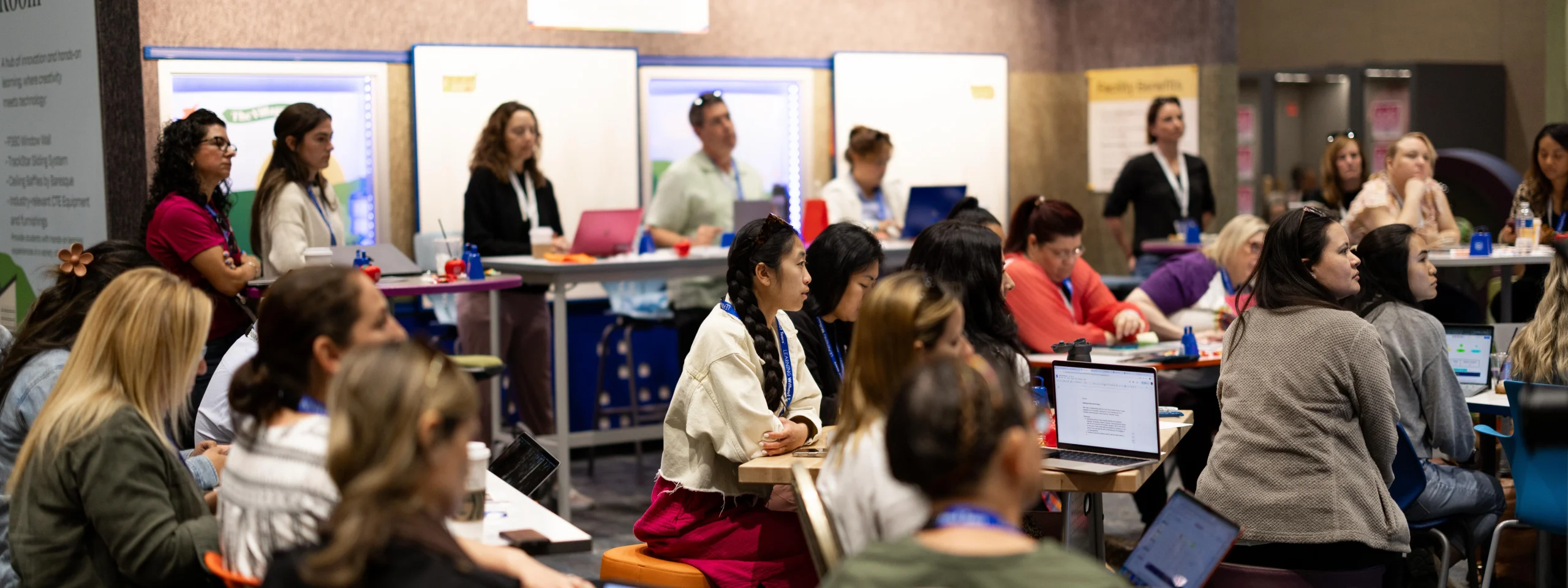
This spring, CAST and CALIE partnered to bring Universal Design for Learning to the center of Spring CUE 2026 in Palm Springs, CA. UDL-Con California was a featured program at one of the state’s largest gatherings of classroom teachers, instructional coaches, IT leaders, and district administrators to tackle the systemic challenges that matter most at Spring CUE, powered by CALIE.
Sessions ran throughout the conference, many led by CAST experts. A pre-conference workshop on March 18 gave participants a hands-on introduction to UDL tools and strategies for designing learning that works for every student.
We asked staff from both organizations the same questions about what this collaboration made possible. Here is what they said.
What makes this partnership work, and should it set a precedent?
CAST
Spring CUE created a real opportunity to connect with educators and innovators who share CAST’s commitment to UDL. The intersection of UDL and technology is especially powerful. Technology has an unprecedented ability to increase access and support learner agency when it is accessible and thoughtfully designed. That has been central to CAST’s work since the 1980s, and it continues to drive our mission today.
Partnerships like this are not just valuable. They model what is possible when organizations align around a shared goal: designing learning experiences that work for each learner from the start.
CALIE
Bringing the Spring CUE and UDL-Con communities together created a space for educators to explore how accessibility, instructional design, learner variability, and technology connect in practice. What made this work was a shared belief that educators are the key to designing meaningful, student-centered learning experiences. CAST’s leadership in UDL helped deepen those conversations and gave educators practical frameworks they could apply immediately.
The challenges facing education are too interconnected for organizations to work independently. Partnerships like this allow us to create more cohesive, forward-thinking learning experiences for educators while building stronger bridges between research, instructional practice, and innovation.
The challenges facing education are too interconnected for organizations to work independently.
Why is UDL so important for today and tomorrow’s learners?
CAST
As education shifts from acquiring information to developing learner expertise, the need for flexible learning environments has never been greater. Learners must be able to plan, navigate, and monitor their own progress in order to thrive in a rapidly changing world. UDL provides a framework for designing those environments — one that anticipates variability rather than retrofitting for it.
Technology plays a critical role in making this vision scalable. When used intentionally, it allows us to design for variability in ways that were not previously possible. The future development of digital educational materials, including AI integration, makes this work both urgent and exciting.
CALIE
As technology, AI, and access to information rapidly evolve, educators play a critical role in designing learning experiences that foster curiosity, agency, critical thinking, and meaningful participation for every learner. At CALIE, we know educators cannot do this work alone. They need ongoing support, collaboration, and opportunities to learn alongside one another as they navigate changing technologies, learner needs, and instructional practices.
UDL provides a powerful foundation for creating more flexible and inclusive learning environments. And thoughtful use of technology can help expand access and deepen learning opportunities for all students.
What were your highlights at Spring CUE 2026?
CAST
One of the most powerful aspects of the conference was connecting with educators from across the country who are actively engaged in this work. A particularly exciting takeaway was seeing how many companies are beginning to prioritize accessibility in the design of their K-12 products and services. When accessibility is built in from the start, it benefits all learners.
I also had the chance to co-lead a session on district-wide UDL implementation alongside partners from Palm Springs Unified School District, sharing four years of work with a room full of educators committed to the same goals. That was a meaningful highlight.
CALIE
One of the clearest highlights was the level of educator interest in conversations around UDL, accessibility, learner variability, and intentional instructional design. UDL-focused sessions filled quickly, and many educators specifically shared that they appreciated seeing a stronger balance between AI, innovation, and inclusive learning design rather than technology presented in isolation.
For me personally, this partnership represented the continuation of work I began supporting UDL implementation in my own district. Bringing CAST into partnership with CALIE and embedding UDL more intentionally across our organization felt like an important milestone, not just for the event, but for a broader vision of helping educators create more accessible, student-centered learning experiences at scale.
Niel Albero Senior Implementation and Professional Learning Specialist, CAST
Rae Fearing Director of Programs, CALIE
Thank you to the CAST team for their partnership and for bringing Universal Design for Learning to the center of Spring CUE 2026. Learn more about their work at cast.org.
We hope to see you at CALIE’s annual conference, March 18-20, 2027 in Palm Springs, CA.
With the passage of AB 873 (requiring media literacy throughout English, science, math, and history), media literacy implementation is necessary. Wasn’t media literacy always necessary? This bill comes with concerns of low media literacy skills and the insurgence of Web 3.0 with the intent “to ensure that all pupils in California are prepared with media literacy skills necessary to safely, responsibly, and critically consume and use social media and other forms of media.” We already had SB 830 (2018) stemming from concerns of low media skills and insurgence of web 2.0 with the intent “…to ensure that young adults are prepared with media literacy skills necessary to safely, responsibly, and critically consume and use social media and other forms of media.”
Access to more information further heightens the importance of media literacy skills.
Media literacy is essential in today’s digital age, where we are constantly bombarded with information from various sources. Being able to distinguish fact from fiction is even more imperative. When memes influence thinking, students need to be able to critically evaluate and analyze content, including media messages and articles in a textbook. Further, being able to discern intent and distinguish between misinformation and disinformation empowers students to navigate the complex landscape of information, enabling them to make informed decisions and contribute to a healthier media ecosystem.
Media literacy is key to accessing, understanding, creating, and responsibly sharing information
Internet use is on the rise. Production and sharing of media are on the rise. Generative Artificial Intelligence is everywhere. The latest technology bombardment of generative artificial intelligence showcases a collective need and weakness of media literacy skills. This is not to be another thing on top of all the things we already do, not an assembly, not a stand-alone lesson, not a checkbox. Rather, incorporate the skills into what you are already doing, continual development, and practice for our ever-changing world.
-Katie McNamara, Director of the Teacher Librarian Program at Fresno Pacific University
A perfect starting point is asking questions
Initial Factual Questions
Deeper Conceptual Questions
Inquiry Questions
Who created the content? What is their intent? How does this make me feel?
Who is being left out? What is being prioritized? What is the call to action?
What do I need to know to understand this better? What am I wondering about?
Below you will find various resources to help your media literacy journey. They range from lessons you can use tomorrow to webinars for personal learning. Your School’s Teacher Librarian is the BEST resource you can access. They are trained in providing instruction in media literacy and are ready to collaborate with you.
Center for Media Literacy Center for Media Literacy (CML) is an educational organization dedicated to promoting and supporting media literacy education as a framework for accessing, analyzing, evaluating, creating, and interacting with media content.
Critical Media Project Critical Media Project (CMP) is a free media literacy web resource for educators and students (ages 8-21) that enhances young people’s critical thinking and empathy and builds on their capacities to advocate for change around questions of identity.
Center for Media and Information Literacy The CMIL works with educators, scholars, parents, children, youth, and the media industry to advance critical analysis of media and the implementation of media literacy programs and advocate for media literacy education.
Media Education Lab The Media Education Lab is an online community that advances the field of digital and media literacy education through leadership development, scholarship, and community engagement.
The Media Spot The Media Spot promotes media literacy through collaborative media productions, K-12 staff and curriculum development, and partnerships with environmentally and socially progressive organizations.
Media Power Youth Media Power Youth provides young people, parents, educators, and communities with curricula, training and workshops to build media literacy knowledge and critical-thinking skills to navigate our media-rich world.
Civic Online Reasoning It’s our desire that the skills students learn through the COR curriculum will not only make them better students but better-informed citizens able to participate in our democracy in an educated and responsible way.
Media Smarts (Canada) MediaSmarts has been developing digital media literacy programs and resources for Canadian homes, schools and communities since 1996. Our work falls into three main areas: education, public awareness, and research and policy.
News Literacy Project The News Literacy Project, a nonpartisan education nonprofit, is building a national movement to advance the practice of news literacy throughout American society, creating better informed, more engaged and more empowered individuals — and ultimately a stronger democracy.
Using TinEye, you can search by image or perform what we call a reverse image search. You can do that by uploading an image or searching by URL. You can also simply drag and drop your images to start your search.
In an era where generative AI produces content at the speed of thought, media literacy is no longer just a beneficial skill but an imperative. Educators face the intricate task of deciphering between AI-generated content and genuine human creation. The classroom is at the forefront of this shifting landscape. View this edWebinar to dive deep into the future of media literacy, with a special focus on the advancements of generative AI
NAMLE NAMLE aims to make media literacy highly valued and widely practiced as an essential life skill.
In a student centric learning environment, teachers create positive experiences when they structure activities with agency, opportunity, and community building. The open ended learning activities below will help students integrate back to classroom learning while feeling valued and part of the group. Share how these activities work for you on social media and tag @cueinc and hashtag #backfrombreak.
Phenomenal Photos: Use awe inspiring photos (from NGSS Phenomena) to boost creativity and build vocabulary. Post a photo for students and ask them to write or draw 5 wonderings about what they see. Encourage students to ask questions about what they see and write them down. Here is a Canva slides template to get you started.
Listmania: Warm up student thinking by providing a topic and ask students to type, write, or draw as many things they can think of related to that topic in 60 seconds. Let students share 1-2 things they jotted down so others can add to their own lists! Starter ideas: Winter Words, Cold Things, January. Get more topic ideas here.
Return Rally Cards: Using slides, docs, or paper, have students write a welcome back greeting card for a classmate. Ideas to include: 3 fun things I hope we get to do before the end of the year or What are 3 ways you know you are back at school – list one thing you hear, one thing you see, and one thing you smell). Get a Return Rally Card Template to use with students.
Odd One Out: Play this Google Arts and Culture game as a whole class, in pairs or individually. Can students spot the odd one out? Guess the AI generated “imposters” hidden among the artworks on Google Arts & Culture. After playing the game let students share in pairs or groups what clues they looked for to help them determine which images may have been AI generate.
Quick Draw: As a class or individually, students can help teach a neural network by adding their drawings to the world’s largest doodling data set. In Quick Draw drawings are shared publicly to help with machine learning research. All individuals draw differently and students can participate and help contribute to machine learning with their own unique style.
Educators are among the most powerful leaders in our state. We create learning that matters, adapt to constant change, and inspire possibility every single day.
For more than four decades, the CUEmmunity harnessed that power by sharing ideas at conferences, learning from each other’s classrooms, and leaning on one another through times of change. We grew into a community of educators who believe in the power of innovation and in the strength that comes from not doing this work alone.
But innovation in education isn’t just about tools or technology. It’s about rethinking how schools adapt, how teachers lead, and how educators connect and support each other in the real work of teaching and learning.
That’s why we evolved. CUE is now CALIE: the California Association for Leading Innovation in Education.
CALIE exists to give teachers, school leaders, and innovators the confidence, tools, and experiences to design classrooms and schools that really work for today’s learners, while also amplifying their professional and leadership goals.
Our Belief
We believe in the power of educators. We are the local leaders sparking meaningful learning, even when the challenges are tough. We push big ideas forward, We lean on each other for support
We know that innovation in education is about people, not just technology. It’s about using innovation to break down barriers to learning. It’s about unlocking potential.
And we believe that together, anything is possible.
What’s Ahead
CALIE’s expanded mission and vision makes it possible for us to do more to support, inspire, and empower more educators than ever before. Over the next year you’ll gain new ways to learn, lead, and connect, including:
The CALIE Certified Educator Program builds skills in instructional design, educational technology, and schoolwide improvement strategies, preparing you to drive change wherever your career takes you.
The CALIE AI Leadership Academy empowers educators and school leaders to build knowledge, skills, and strategies for ethical, impactful integration of artificial intelligence in education.
A stronger statewide network that makes sure you are heard, supported, and inspired.
Whether you’ve been with us for years or you’re just discovering this community, we’re glad you’re here.
Welcome to CALIE. Let’s spark meaningful learning, together.
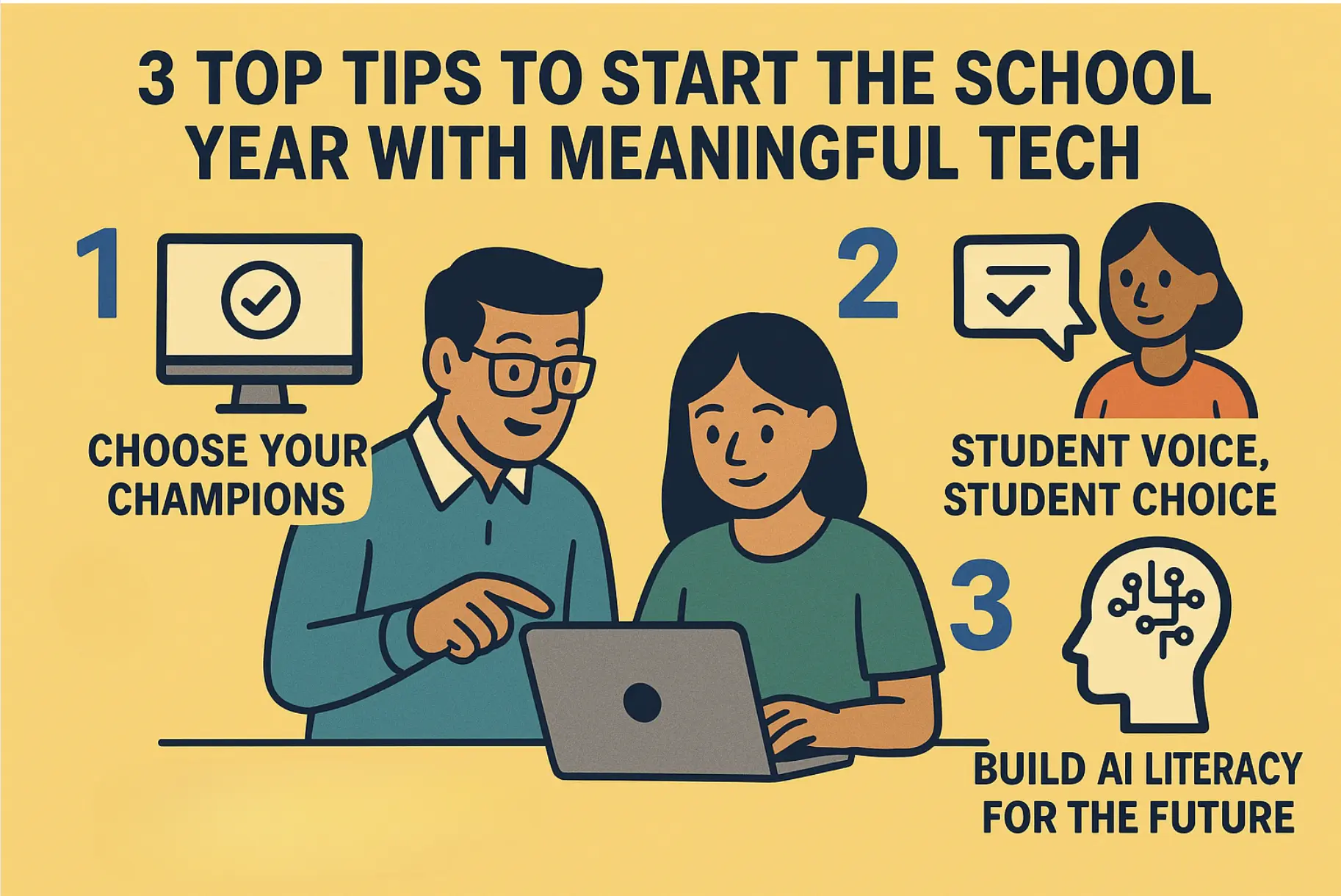
As educators prepare for another school year, the promise and pressure of educational technology looms large. With countless apps, platforms, and digital tools vying for classroom attention, it’s easy to feel overwhelmed by the possibilities—or paralyzed by the choices. The key to meaningful tech integration isn’t about using more tools; it’s about using the right tools well.
Here are three essential strategies to help you start the school year with purposeful, impactful technology use.
Tip 1: Choose Your Champions—Quality Over Quantity
One pitfall educators may experience is tool overload. Instead of trying to master every different platform you see on social media or in your colleagues orbits, identify 2-3 core technologies that align with your learning objectives and commit to mastering them. Bonus points if you can leverage a tool that your school or district already supports. They may already have resources, coaches, or trainings on those tools.
When selecting your tech champions, ask yourself: Does this tool solve a real problem in my classroom? Does it enhance learning in ways that wouldn’t be possible without it? Can I see myself and my students becoming genuinely proficient with it over time?
Remember, students learn better when they can develop deep familiarity with tools rather than constantly adapting to new interfaces. A well-implemented Google Workspace, learning management system, or creative platform will always outperform a scattered collection of half-learned applications.
Tip 2: Student Voice, Student Choice
The most meaningful technology integration happens when students have agency in their learning tools. Rather than mandating specific apps or platforms for every task, create opportunities for students to explore and advocate for the technologies that resonate with their learning styles and interests.
Consider starting the year with a “tech showcase” where students can demonstrate tools they already use for creativity, organization, or learning. Build choice into your assignments—let students choose between creating a video, podcast, infographic, or interactive presentation to demonstrate their understanding.
When students feel ownership over their digital tools, engagement naturally follows. They become collaborators in the learning process rather than passive recipients of predetermined tech experiences. This approach also prepares them for real-world scenarios where they’ll need to evaluate and select appropriate tools for different tasks.
Tip 3: Build AI Literacy for the Future
Artificial intelligence isn’t just coming to education—it’s already here. Rather than avoiding or fearing AI tools, this school year presents an opportunity to help students develop critical AI literacy skills that will serve them throughout their academic and professional lives.
Begin by becoming comfortable with AI tools yourself. Experiment with using AI for lesson planning, creating discussion questions, or generating multiple perspectives on complex topics. Once you’ve developed confidence with AI as an educator, you can better guide students in meaningful integration.
Make the most of well-crafted prompt stems when introducing AI to students. Try prompts like:
“Create a Socratic dialogue between [historical figure] and [modern expert] about [current issue] that reveals three different perspectives” or
“Generate a scenario where students must evaluate conflicting AI-generated arguments about [topic] and identify potential biases or gaps in reasoning” or
“Design a problem-solving activity where AI provides initial research, but students must synthesize, critique, and build upon that information to reach their own conclusions.”
Most importantly, focus on developing skills that complement AI: critical thinking, creativity, emotional intelligence, and complex problem-solving. When students understand both AI’s capabilities and limitations, they’re better positioned to use these tools thoughtfully and effectively.
Moving Forward with Purpose
Meaningful technology integration isn’t about keeping up with the latest trends—it’s about thoughtfully selecting, implementing, and reflecting on the tools that truly enhance learning. By focusing your efforts, amplifying student voice, and preparing learners for an AI-enhanced future, you’ll create a classroom environment where technology serves learning rather than distracting from it.
As you embark on this school year, remember that the most powerful educational technology is still an engaged teacher working with curious students. Everything else is just a tool to help make that magic happen.
Written by Tiffani Brown, Program Specialist at CUE. This post has AI-supported content that was human-reviewed.
As educators prepare for another school year, the promise and pressure of educational technology looms large. With countless apps, platforms, and digital tools vying for classroom attention, it’s easy to feel overwhelmed by the possibilities—or paralyzed by the choices. The key to meaningful tech integration isn’t about using more tools; it’s about using the right tools well.
Here are three essential strategies to help you start the school year with purposeful, impactful technology use.
Tip 1: Choose Your Champions—Quality Over Quantity
One pitfall educators may experience is tool overload. Instead of trying to master every different platform you see on social media or in your colleagues orbits, identify 2-3 core technologies that align with your learning objectives and commit to mastering them. Bonus points if you can leverage a tool that your school or district already supports. They may already have resources, coaches, or trainings on those tools.
When selecting your tech champions, ask yourself: Does this tool solve a real problem in my classroom? Does it enhance learning in ways that wouldn’t be possible without it? Can I see myself and my students becoming genuinely proficient with it over time?
Remember, students learn better when they can develop deep familiarity with tools rather than constantly adapting to new interfaces. A well-implemented Google Workspace, learning management system, or creative platform will always outperform a scattered collection of half-learned applications.
Tip 2: Student Voice, Student Choice
The most meaningful technology integration happens when students have agency in their learning tools. Rather than mandating specific apps or platforms for every task, create opportunities for students to explore and advocate for the technologies that resonate with their learning styles and interests.
Consider starting the year with a “tech showcase” where students can demonstrate tools they already use for creativity, organization, or learning. Build choice into your assignments—let students choose between creating a video, podcast, infographic, or interactive presentation to demonstrate their understanding.
When students feel ownership over their digital tools, engagement naturally follows. They become collaborators in the learning process rather than passive recipients of predetermined tech experiences. This approach also prepares them for real-world scenarios where they’ll need to evaluate and select appropriate tools for different tasks.
Tip 3: Build AI Literacy for the Future
Artificial intelligence isn’t just coming to education—it’s already here. Rather than avoiding or fearing AI tools, this school year presents an opportunity to help students develop critical AI literacy skills that will serve them throughout their academic and professional lives.
Begin by becoming comfortable with AI tools yourself. Experiment with using AI for lesson planning, creating discussion questions, or generating multiple perspectives on complex topics. Once you’ve developed confidence with AI as an educator, you can better guide students in meaningful integration.
Make the most of well-crafted prompt stems when introducing AI to students. Try prompts like:
“Create a Socratic dialogue between [historical figure] and [modern expert] about [current issue] that reveals three different perspectives” or
“Generate a scenario where students must evaluate conflicting AI-generated arguments about [topic] and identify potential biases or gaps in reasoning” or
“Design a problem-solving activity where AI provides initial research, but students must synthesize, critique, and build upon that information to reach their own conclusions.”
Most importantly, focus on developing skills that complement AI: critical thinking, creativity, emotional intelligence, and complex problem-solving. When students understand both AI’s capabilities and limitations, they’re better positioned to use these tools thoughtfully and effectively.
Moving Forward with Purpose
Meaningful technology integration isn’t about keeping up with the latest trends—it’s about thoughtfully selecting, implementing, and reflecting on the tools that truly enhance learning. By focusing your efforts, amplifying student voice, and preparing learners for an AI-enhanced future, you’ll create a classroom environment where technology serves learning rather than distracting from it.
As you embark on this school year, remember that the most powerful educational technology is still an engaged teacher working with curious students. Everything else is just a tool to help make that magic happen.
Written by Tiffani Brown, Program Specialist at CUE. This post has AI-supported content that was human-reviewed.
On July 21, 2025, the U.S. Department of Education published a Proposed Priority and Definitions—Secretary’s Supplemental Priority and Definitions on Advancing Artificial Intelligence in Education (Docket ID ED‑2025‑OS‑0118, FR Doc 2025‑13650, 90 FR 34203–34206)1 for a 30‑day public comment period a proposed priority that could shape the next decade of learning: Advancing Artificial Intelligence in Education. It’s not just a funding move—it’s a signal. A signal that the future of education is now, and it will be influenced, shaped, and redefined by AI.
What should school leaders do this year to prepare?
This is bigger than adopting a tool or adding an AI training to your PD calendar. Forward thinking leaders will use this year strategically to ensure all staff build awareness and confidence around AI, what it is, how it’s showing up in education, and how to integrate it thoughtfully into teaching and learning. It’s not about turning everyone into AI experts, it’s about making sure no one is left out of the conversation.
Why This Matters Now
We are no longer at the beginning of the AI conversation. We’re at the inflection point. The Department’s proposed definition of AI literacy sets a powerful foundation: “The technical knowledge, durable skills, and future-ready attitudes required to thrive in a world influenced by AI. It enables learners to engage, create with, manage, and design AI, while critically evaluating its benefits, risks, and implications.”
AI literacy isn’t just for coders or tech electives. It’s for every student. And every educator needs to be ready to help students meet that challenge.
Key Priorities for Leaders to Focus On This Year
Let’s cut through the 1,000-foot policy language and get specific about what this means for school and district leaders.
Here are three priorities to focus on right now:
Priority 1: Invest in Educator Learning First
Before we ask teachers to teach about AI or integrate AI into their classrooms, we need to start by investing in their confidence and understanding.
This includes:
Professional learning that explains how AI works (and where it doesn’t)
Opportunities to explore ethical questions around AI in instruction and student use
Support for integrating AI into their own workflows—lesson planning, assessment, communication
This school year is the time to start building lasting capacity—not just offering one-off training. Ask yourself: Do your teachers have the language, space, and tools to talk about AI with their students confidently?
Priority 2: Infuse AI Literacy Across the Curriculum
AI should not live in a single elective or tech department. It should show up in social studies, where students analyze bias in algorithmic decision-making. In English, where they learn to spot AI-generated misinformation. In science, where students explore data, pattern recognition, and models.
This year, challenge your team to:
Identify natural crossovers between current curriculum and AI concepts
Pilot AI literacy units that connect to real-world issues
Talk about AI as a human issue, not just a technical one
Priority 3: Leverage AI to Support Learning and Innovation
There’s a lot of hype around AI tools. Some of it’s legit. Some of it’s smoke and mirrors. But here’s the part we should pay attention to:
How might AI help us address the long-standing challenges that have nothing to do with technology?
Can AI help us personalize learning in ways that support students with disabilities or multilingual learners?
Can it free up time for teachers by handling repetitive admin tasks?
Can we use AI to offer high-quality tutoring or college and career guidance in schools that have never had access before?
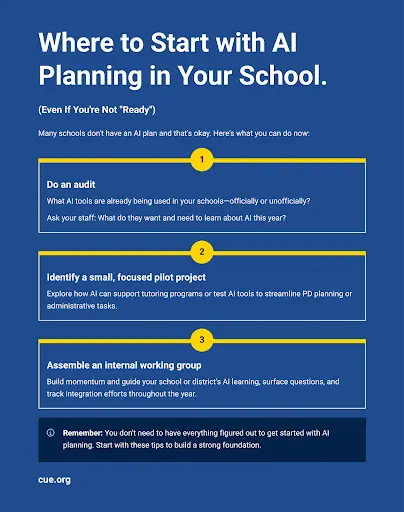
Where to Start (Even If You’re Not “Ready”)
Many schools don’t have an AI plan and that’s okay. Here’s what you can do now:
Do an audit: What AI tools are already being used in your schools—officially or unofficially?
Ask your staff: What do they want and need to learn about AI this year?
Identify a small, focused pilot project (AI in tutoring? PD workflow? Student media literacy unit?)
Assemble an internal working group to keep the conversation moving—and build momentum.
You don’t need a finished plan to make progress—these early actions help build staff awareness, build momentum toward AI literacy, and create a strong foundation for future planning.
What This Priority Could Mean for Funding & Strategy
This new federal priority lays the groundwork for future funding opportunities that will reward the districts already doing the work. That means this year’s efforts can double as strategy and grant prep.
Use this year to:
Document your teacher training efforts
Design programs that align with the proposed categories (dual enrollment, certifications, teacher prep, etc.)
Gather evidence of what’s working—those data points will matter when the next round of funding opens up
This new proposed priority from the U.S. Department of Education gives school leaders an opportunity to take a thoughtful, proactive approach to AI without rushing, overhauling everything, or getting lost in the buzz. You don’t need your staff to be an AI experts, you need to be clear about your goals for teaching and learning, and willing to ask how AI fits into that vision.
Start small and use the ideas in this post to:
Ground your team in a shared understanding of what AI literacy means.
Build confidence and clarity through targeted professional learning.
Create safe spaces for teachers to experiment, reflect, and collaborate.
Center your decisions on what’s best for students, not just what’s trending.
AI is already part of our world and school leadership isn’t about having all the answers—it’s about asking the right questions, bringing your educators into the conversation, and making intentional moves.
The U.S. Department of Education’s proposed priority offers a clear invitation for schools to lead this work with purpose and reflection. If you haven’t already, take a moment to review the proposal and consider submitting a comment at this link by selecting ‘public comments’ in the menu bar on the left. Your voice as a school leader matters in shaping how this policy supports the real work happening in classrooms every day.
U.S. Department of Education. Proposed Priority and Definitions—Secretary’s Supplemental Priority and Definitions on Advancing Artificial Intelligence in Education. Federal Register, Vol. 90, No. 139, July 21, 2025, pp. 34203–34206. https://www.federalregister.gov/documents/2025/07/21/2025-13650↩︎
Join us for the 10th Annual U.S. Media Literacy Week, hosted by NAMLE (National Association for Media Literacy Education) from October 21-25! As tech leaders in your schools and districts, you already understand the importance of integrating innovative tools into your teaching. Media literacy is a crucial component of preparing students to critically analyze information and navigate the digital landscape with confidence.
Here’s how you can enhance your edtech practices and make media literacy a powerful tool in your classroom:
What It Offers: NAMLE, the official host of Media Literacy Week, provides an array of resources, including videos, webinars, and toolkits, all designed to help teachers incorporate media literacy into their lessons. They also host the Media Literacy Resource Showcase during the week, where educators can explore the latest tools and strategies for teaching these critical skills.
Free Teacher Accounts: No account is necessary, and many of NAMLE’s resources, webinars, and events are freely accessible on their website.
Why It’s Great for Innovators: NAMLE’s comprehensive materials support you in staying ahead of the curve, offering cutting-edge strategies and resources to integrate media literacy seamlessly into your technology-rich classroom.
What It Offers: AllSides for Schools provides a Media Bias Chart and curated news stories from across the political spectrum, helping students compare diverse perspectives on the same issue. This resource can be easily integrated into your existing digital curriculum to promote critical thinking and nuanced discussion in the classroom.
Free Teacher Accounts: Yes, AllSides offers free teacher accounts, giving you access to lesson plans, discussion guides, and a range of interactive media bias tools.
Why It’s Great for Innovators: You can use AllSides to create interactive lessons where students analyze bias using digital tools, enhancing their media literacy skills while promoting digital age thinking.
What It Offers: Checkology is an interactive platform that guides students through real-world scenarios to teach them how to recognize misinformation, evaluate sources, and understand the role of the media in a democracy. It’s an ideal resource for tech leaders who want to add more immersive, student-led learning experiences to their classroom.
Free Teacher Accounts: Yes, Checkology offers free accounts with access to most of its core media literacy lessons.
Why It’s Great for Innovators: Checkology’s gamified learning modules allow students to engage in simulations where they become media detectives, building crucial literacy skills while leveraging your classroom’s technology tools.
How This Supports Your Innovative Teaching Practices:
AllSides For Schools and Checkology both integrate seamlessly with the digital tools and learning management systems you’re already using, enabling you to enhance student engagement and create dynamic, interactive lessons.
By incorporating these media literacy tools, you’ll empower students to become critical thinkers and responsible digital citizens, preparing them for the challenges of a tech-driven world.
These resources promote student-centered learning, allowing you to facilitate discussions that foster a deeper understanding of the digital media landscape.
ISTE DigCit Competencies
In today’s digital world, every school needs a robust digital citizenship program to ensure students are safe, responsible, and proactive online. The ISTE Digital Citizenship Competencies are a great starting point, shifting the focus from what students shouldn’t do to empowering them with the skills and mindset to become thoughtful, empathetic digital citizens. By incorporating these competencies alongside media literacy tools like AllSides and Checkology, educators can create a holistic approach to teaching students how to navigate, evaluate, and contribute to the digital world. Explore ISTE’s comprehensive resources here.
Leverage these powerful tools during Media Literacy Week to inspire students to critically engage with the world around them while furthering your innovative teaching practices. Let’s continue to lead the way in digital education this October!
Creating a vibrant, student-centered learning environment is a transformative journey filled with excitement and possibility. As we consider how our learning spaces will welcome our learners back to school, let’s embrace the opportunity to reimagine our classrooms with strategies that celebrate and amplify student voice and choice while supporting each unique learner. This Edutopia video, “How to Set Up a Learner-Centered Classroom,” provides practical tips and real-world examples to help you visualize and actualize your ideas. It’s not just about setting up a space; it’s about cultivating a dynamic community where every student feels supported and inspired.
Collaborative Classroom Design
Another innovative strategy is setting up a Calming or Peace Corner—a designated space for students to retreat and self-regulate when they feel overwhelmed. This is also referred to as a Calm Corner, Reflection Station, or Mindfulness Area. Whatever you call it, make sure that this area is a positive, reflective space rather than a punitive one, allowing students to recharge and return to learning with a clear mind. Read about Incorporating a Calming Corner Into Station Rotations for dozens of ideas to get you started. Bridging Apps even has a list of helpful apps for students to help them regulate and calm down for early elementary, upper elementary, middle school, and high school.
Developing a Social Contract
Building a classroom community starts with establishing clear expectations. Instead of imposing rules, work with your students to create a social contract or a set of norms. This process gives them a sense of ownership and accountability. Once the contract is agreed upon and signed off by your students, display it prominently in the classroom as a constant reminder of their shared commitments.
Creating a Calming Corner
Another innovative strategy is setting up a Calming or Peace Corner—a designated space for students to retreat and self-regulate when they feel overwhelmed. This is also referred to as a Calm Corner, Reflection Station, or Mindfulness Area. Whatever you call it, make sure that this area is a positive, reflective space rather than a punitive one, allowing students to recharge and return to learning with a clear mind. Read about Incorporating a Calming Corner Into Station Rotations for dozens of ideas to get you started. Bridging Apps even has a list of helpful apps for students to help them regulate and calm down for early elementary, upper elementary, middle school, and high school.
Routine Discussions and Active Listening
Integrating daily routines for open discussions can significantly enhance student engagement. Morning meetings, for example, provide a structured opportunity for every Two young students happily engaged in reading together, fostering a learner-centered classroom environment student to voice their thoughts and listen to others. For older students, Socratic Circles can foster deeper conversations and respectful debate, promoting critical thinking and empathy.
Empowering Student Voices
Above all, empowering student voices and supporting every student is key to a thriving classroom environment. Sharing the floor with students and encouraging open dialogue helps them feel heard and respected. Whether you plan for this time or allow it to happen organically, we can all benefit from putting energy toward hosting discussion spaces rather than leading them. This approach not only builds their confidence but also strengthens the classroom community.
Implementing these practices can transform your classroom into a dynamic and supportive space where every student thrives. Let’s embark on this journey together, creating classrooms that are not just places of learning, but communities where joy, creativity, and connection flourish.