Elevating K-12 Classrooms with Comprehensive Media Literacy

From Legislation to Learning

  • With the passage of AB 873 (requiring media literacy throughout English, science, math, and history), media literacy implementation is necessary. Wasn’t media literacy always necessary? This bill comes with concerns of low media literacy skills and the insurgence of Web 3.0 with the intent “to ensure that all pupils in California are prepared with media literacy skills necessary to safely, responsibly, and critically consume and use social media and other forms of media.” We already had SB 830 (2018) stemming from concerns of low media skills and insurgence of web 2.0 with the intent “…to ensure that young adults are prepared with media literacy skills necessary to safely, responsibly, and critically consume and use social media and other forms of media.” 

Access to more information further heightens the importance of media literacy skills.

  • Media literacy is essential in today’s digital age, where we are constantly bombarded with information from various sources. Being able to distinguish fact from fiction is even more imperative. When memes influence thinking, students need to be able to critically evaluate and analyze content, including media messages and articles in a textbook. Further, being able to discern intent and distinguish between misinformation and disinformation empowers students to navigate the complex landscape of information, enabling them to make informed decisions and contribute to a healthier media ecosystem.

Media literacy is key to accessing, understanding, creating, and responsibly sharing information

  • Internet use is on the rise. Production and sharing of media are on the rise. Generative Artificial Intelligence is everywhere. The latest technology bombardment of generative artificial intelligence showcases a collective need and weakness of media literacy skills. This is not to be another thing on top of all the things we already do, not an assembly, not a stand-alone lesson, not a checkbox. Rather, incorporate the skills into what you are already doing, continual development, and practice for our ever-changing world.

-Katie McNamara, Director of the Teacher Librarian Program at Fresno Pacific University

A perfect starting point is asking questions
Initial Factual QuestionsDeeper Conceptual QuestionsInquiry Questions
Who created the content? What is their intent? How does this make me feel?Who is being left out? What is being prioritized? What is the call to action?What do I need to know to understand this better? What am I wondering about?

Below you will find various resources to help your media literacy journey. They range from lessons you can use tomorrow to webinars for personal learning. Your School’s Teacher Librarian is the BEST resource you can access. They are trained in providing instruction in media literacy and are ready to collaborate with you.

Center for Media Literacy
Center for Media Literacy (CML) is an educational organization dedicated to promoting and supporting media literacy education as a framework for accessing, analyzing, evaluating, creating, and interacting with media content.

Critical Media Project
Critical Media Project (CMP) is a free media literacy web resource for educators and students (ages 8-21) that enhances young people’s critical thinking and empathy and builds on their capacities to advocate for change around questions of identity.

Center for Media and Information Literacy
The CMIL works with educators, scholars, parents, children, youth, and the media industry to advance critical analysis of media and the implementation of media literacy programs and advocate for media literacy education.

Media Education Lab
The Media Education Lab is an online community that advances the field of digital and media literacy education through leadership development, scholarship, and community engagement.

The Media Spot
The Media Spot promotes media literacy through collaborative media productions, K-12 staff and curriculum development, and partnerships with environmentally and socially progressive organizations.

Media Power Youth
Media Power Youth provides young people, parents, educators, and communities with curricula, training and workshops to build media literacy knowledge and critical-thinking skills to navigate our media-rich world.

Crash Course Web Series

Civic Online Reasoning
It’s our desire that the skills students learn through the COR curriculum will not only make them better students but better-informed citizens able to participate in our democracy in an educated and responsible way.

KQED

Media Smarts (Canada)
MediaSmarts has been developing digital media literacy programs and resources for Canadian homes, schools and communities since 1996. Our work falls into three main areas: education, public awareness, and research and policy.

News Literacy Project
The News Literacy Project, a nonpartisan education nonprofit, is building a national movement to advance the practice of news literacy throughout American society, creating better informed, more engaged and more empowered individuals — and ultimately a stronger democracy.

California Better Together (Must Register for a Free Account)

TinEye Reverse Image Search

  • Using TinEye, you can search by image or perform what we call a reverse image search. You can do that by uploading an image or searching by URL. You can also simply drag and drop your images to start your search.

A Fresh Take on Media Literacy in the Era of AI

In an era where generative AI produces content at the speed of thought, media literacy is no longer just a beneficial skill but an imperative. Educators face the intricate task of deciphering between AI-generated content and genuine human creation. The classroom is at the forefront of this shifting landscape. View this edWebinar to dive deep into the future of media literacy, with a special focus on the advancements of generative AI

NAMLE
NAMLE aims to make media literacy highly valued and widely practiced as an essential life skill.

Learning and Growing Together: The Power of Conferences to Ignite Personal and Professional Growth with Christine Feenstra, Executive Director of CUE

What is the current state of EdTech in schools?
How can integrating technology in teaching deliver positive outcomes?

Find out answers to these questions and more on the latest episode of Learning Through Technology.

Join Pacific One Source on their recent podcast episode as they connect with our own Christine Feenstra, Executive Director at CUE.

Insights from the podcast:

  • Discover how CUE plays a crucial role in helping schools and districts get a return on their technology investments.
  • Learn how professional learning, mentorship, and networking opportunities are key in driving educational outcomes.
  • Get ready for Spring CUE and discover how it fuels innovation and drives positive outcomes for educators.

Let Christine, along with hosts Alex and Bob, take you on a journey as they share stories of their favorite teachers and the impact they had on their education.

Thank you to Pacific One Source and ViewSonic for sponsoring the episode and helping to make the podcast possible!

Empowering Inclusive Learning: Bridging the Digital Divide

Addressing the digital design divide is crucial in today’s educational landscape, where integrating technology in learning environments is not just an enhancement but a necessity for equitable access to quality education. According to the National Educational Technology Plan, this divide represents the gap between educational systems that provide educators with the necessary time, resources, and support to effectively design learning experiences using digital tools and those that do not. 1As the architects of learning, teachers need to identify and advocate for their professional learning preferences and needs. By doing so, they can drive the implementation of Universal Design for Learning (UDL) principles in their schools, ensuring that their professional development reflects diverse learning strengths and needs. This approach supports teachers in their instructional design and models the inclusive, adaptive, and personalized learning environments we aim to create for students. 

To bridge this divide, here are proactive steps educators can take within their school communities:

Initiate Conversations

Start discussions with school leadership about the importance of UDL and the benefits of integrating technology in learning designs to support diverse student needs. Here are some prompts to help initiate conversations about the importance of UDL and technological integration with school leadership:

  • I’ve been exploring Universal Design for Learning (UDL) principles and their impact on student learning. Can we discuss how these might be more deeply integrated into our school’s curriculum and teaching practices?
  • Considering our students’ diverse needs, integrating UDL principles with our current technology resources could significantly improve engagement and outcomes. Let’s set aside time to explore this further.
  • We have an opportunity to take the lead in creating an inclusive learning environment through UDL. Would you be open to exploring how we could pilot some of these ideas in our classrooms?
  • To support our goals of inclusivity and high academic achievement, I’d love to propose some ideas for integrating UDL principles with our educational technology. When would be a good time to discuss this?

Share Resources and Success Stories

Distribute articles, research findings, and case studies highlighting the effective use of technology in education and how it supports UDL principles. Here are some resources to get you started. 

Form a Committee or Interest Group

Start by identifying colleagues interested in leveraging technology to enhance teaching and learning. Reach out through email, staff meetings, or informal conversations to gauge interest. Once you have a core group, organize an initial meeting to discuss goals, such as exploring new digital tools, developing UDL-aligned lesson plans, or advocating for school-wide technology initiatives. Establish regular meeting times and use collaborative tools like Google Docs or Microsoft Teams to keep track of ideas, research, and project progress. Consider inviting guest speakers, such as technology integration specialists or educators from other schools, who can share their experiences and insights.

Participate in Pilot Programs

To get involved in pilot programs, watch for opportunities announced by your school district, educational technology companies, or professional education networks. Express your interest to your administration and explain how participating in a pilot program can benefit your classroom and provide valuable insights for the entire school. When testing a new digital tool or teaching method, document the process, including how often you use the tools and for what, student feedback, and academic outcomes. Consider creating a case study or presentation to share with your colleagues and school leadership at the pilot’s conclusion, highlighting the tool’s impact on learners, challenges encountered, and recommendations for broader implementation.

Provide Feedback

Offer constructive feedback on technology use and professional development programs, emphasizing how they could be improved to support UDL. Schedule regular, dedicated sessions where teachers can discuss their experiences with current technology and professional development offerings. This could be a component of a faculty meeting, or a separate meeting focused on evaluating and providing feedback on the tools and training provided by the district. Another option is to use digital platforms like Google Forms to create surveys that teachers can complete anonymously. These can cover various aspects of technology integration and professional development on technology, allowing educators to offer candid feedback and suggestions for improvement. As an example, consider the value of having district-wide data on teacher perception of the following prompts:

  • Do the digital tools provided by the district support creating an inclusive learning environment for all students, including those with disabilities?
  • What challenges have you faced in integrating technology into your lessons?
  • Are there any specific tools or resources that would enhance your teaching but are currently unavailable in our district?
  • Please share specific examples of technology tools or professional development sessions that have positively impacted your teaching.

This feedback can inform decisions on technology purchases, professional development offerings, and strategies to foster a more collaborative and inclusive educational environment. This can also be done on a large scale using surveys like the Project Tomorrow Speak Up Survey – which CUE has partnered with to learn more about the views of educators on the most critical education issues of the day.

Collaborate with IT Staff

Work closely with your school’s IT department to understand the capabilities and limitations of current technology resources, explore potential upgrades or acquisitions, and advocate for professional development opportunities focusing on digital literacy and educational technology tools. Educators looking to collaborate effectively with IT staff can dive into the conversation with targeted questions that bridge the gap between educational needs and technological capabilities. For example:

  • What technology resources are currently available to teachers and students? Note: Asset mapping tools like those developed by Digital Promise, the Tarrant Institute for Innovative Education in Vermont, or You for Youth may be helpful.
  • Based on our district vision and strategic goals, what technology tools or resources are we lacking?
  • What upgrades or acquisitions are being considered, and how do they align with our educational objectives?
  • How do we ensure all technology resources are accessible to students with diverse learning needs?
  • What opportunities are available for teachers to receive training on existing and new technology resources?
  • How can we establish a regular communication channel between educators and the IT department to address ongoing needs and feedback?

Advocate for Accessibility

Tackling digital accessibility is critical to ensuring all students benefit from technology tools. First, start by understanding the basics of web accessibility standards, such as those outlined in the Web Content Accessibility Guidelines (WCAG). This checklist covers a range of needs, from visual and auditory to cognitive and motor, ensuring your digital content is accessible to a diverse student body. The checklist is just the beginning. You can also leverage the power of free online tools designed to assess and improve the accessibility of digital content. Tools like AChecker can scan your digital resources, highlight issues, and offer suggestions to fix them.

Promote a Culture of Continuous Learning

Encourage an environment where educators and students are seen as lifelong learners, always open to exploring new technologies and methodologies. Teachers can use and advocate for strategies that embrace the principles of universal design for learning (UDL) to foster a culture of continuous learning within a school, especially through faculty meetings and Professional Learning Communities (PLCs). Consider the following:

  • Advocate for implementing instructional rounds within PLCs, where teachers observe each other’s classes to gain insights and inspiration. 
  • Introduce Pineapple Charts in common areas, such as the staff room, where teachers can invite colleagues to observe innovative practices or new tools being used in their classrooms. 
  • Work with admin to see if it’s possible to dedicate time for teachers in each faculty meeting to demonstrate new educational tools or technologies they have found effective. 
  • Organize informal meet-ups where teachers can share tips, tools, and strategies they’ve found effective in incorporating technology into their teaching. Encourage participation from teachers across different subjects and grade levels. Diverse perspectives can unveil unique technology applications and promote cross-curricular ideas. As you continue to meet, keep records of shared strategies, tools, and resources from each session for those who couldn’t attend or wish to review. Consider creating a shared digital space (e.g., a Google Drive folder or a shared LMS course) where these insights can be accessed anytime.

By incorporating these practices, educators can play a pivotal role in closing the digital design divide, leading to more inclusive, engaging, and effective learning environments for all students.

To elevate your instructional practices and effectively champion your professional growth needs, consider embracing a strategy inspired by the National Educational Technology Plan: craft your own “Portrait of an Educator.” This proactive approach empowers you to articulate your goals, learning preferences, technological proficiencies, and the support structures that best facilitate your success.

In our journey to refine educational experiences, we must acknowledge the diversity of all learners, including educators. By delving into your unique learner profile and asserting your specific needs, you challenge school and district leaders to adapt and innovate to bolster educator support. This initiative is a practical application of Universal Design for Learning (UDL) principles and enlightens our collective understanding of the dynamic needs within modern classrooms. Such an endeavor ensures that no student, particularly those facing the greatest challenges, is overlooked or underserved.

Imagine the transformative potential when educators feel fully equipped and supported in their professional development. This catalyzes personal and professional growth and mirrors the inclusive, adaptive learning environments we aspire to create for our students. Let this vision guide you in advocating for technological tools and a comprehensive framework that acknowledges and addresses the wide spectrum of learning needs across our educational communities. Together, we can redefine what it means to be a learner and an educator in the digital age, ensuring that every member of our educational ecosystem is empowered to thrive.

  1. U.S. Department of Education, Office of Educational Technology. (2016). Reimagining the role of technology in education: 2016 National Educational Technology Plan. [PDF file]. https://tech.ed.gov/files/2015/12/NETP16.pdf ↩︎

Breaking Barriers: The Impact of ADA’s New Digital Accessibility Rules on Education

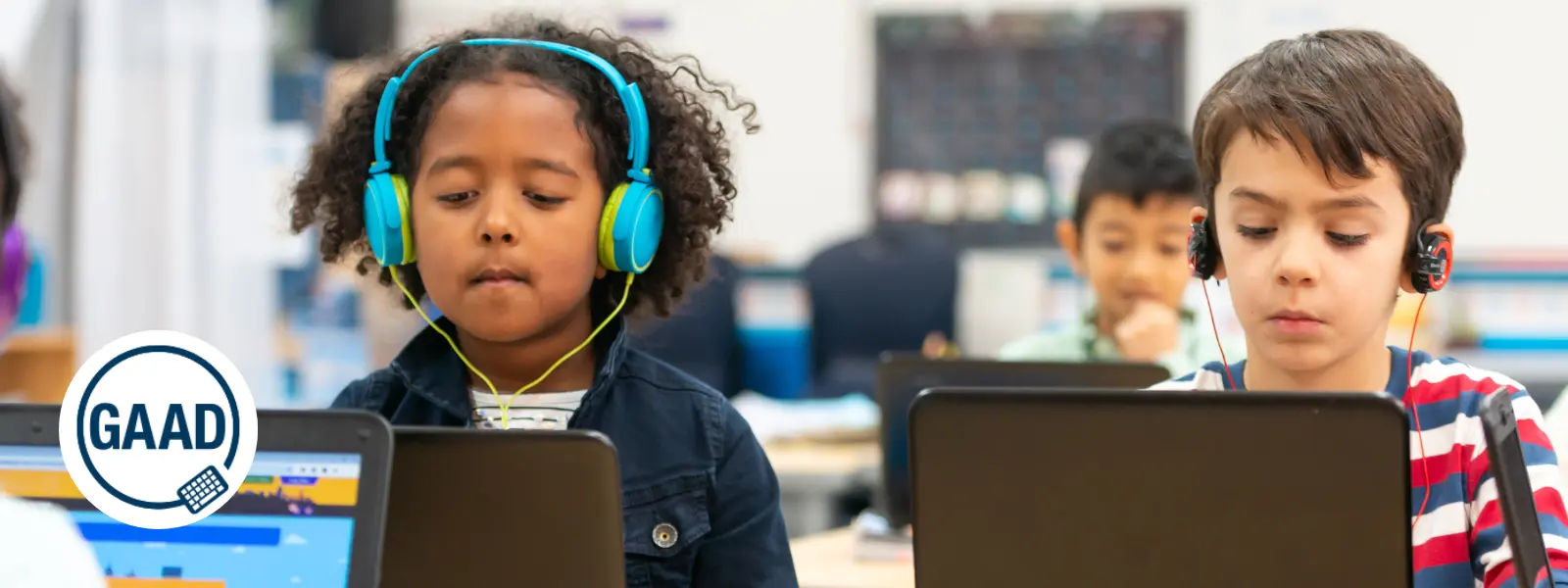
This week marks the 13th annual Global Accessibility Awareness Day (GAAD) which sets out to “get everyone talking, thinking, and learning about digital access/inclusion and people with different disabilities.” (GAAD, 2024) Let’s take a moment to think about why digital accessibility in education really matters. We can use this as an opportunity to ensure that all learners, especially those with disabilities, have equitable access to educational technologies.

This year, GAAD coincides with a pivotal update from the U.S. Department of Justice concerning digital accessibility. A new rule under Title II of the Americans with Disabilities Act (ADA) mandates that all state and local government services, including public education systems, adhere to the Web Content Accessibility Guidelines (WCAG) 2.1, Level AA. (Check out this resource which offers an overview of the WCAG 2.1 AA Standards.) For us educators, this rule is a game changer. It delineates clear compliance standards for digital content and mobile applications used in our classrooms. Whether it’s online coursework, educational apps, or instructional videos, these resources must be fully accessible to all students, including those with visual, hearing, motor, or cognitive impairments.

What does this mean for our daily teaching practices? 

We must ensure that digital materials—like texts and multimedia—are designed with features like alt text for images, keyboard navigation capabilities, and captioning for videos. These are not just legal requirements; they are best practices that enhance learning for everyone. The rule specifies compliance timelines based on the size of the entity, giving schools a structured timeframe to make necessary updates. 

This is our call to action to audit and enhance our educational tools and platforms.

Let’s view these new ADA requirements not just as a statutory obligation but as an opportunity to foster an inclusive learning environment. By prioritizing accessibility, we not only support our students with disabilities but also enrich our educational practices, making learning more engaging and effective for every student. As we move forward together, let’s pledge to meet these standards, celebrating them as foundational to educational equity. Together, we can make our digital educational spaces accessible for all, paving the way for a more inclusive future in education.

Top 5 Education Research Podcasts

Here are 5 educator podcasters who are also engaged in research or feature current researchers. These podcasts provide valuable insights into current educational research and its practical applications for educators.

1.  The Learning Scientists Podcast

This podcast focuses on evidence-based practice in education. Hosted by cognitive psychologists, it covers topics like learning theories and effective teaching strategies.

2. The Education Gadfly Show (Fordham Institute)

Discussions of recent education news, usually featuring Fordham’s Mike Petrilli and David Griffith. Then Amber Northern will recap a recent research study.

3. Meet the Education Researcher (Monash University)

Emerging issues and the latest ideas from across the world of education research. This is a monthly podcast that covers innovative research that will certainly expand your thinking.

4. Naylor’s Natter (Phil Naylor)

Phil Naylor’s podcast focuses on evidenced based teaching and features discussions with educators and researchers about the latest developments in teaching and learning. His episodes often highlight current research and its implications for classroom practice.

5. Truth for Teachers Podcast (Angela Watson)

Angela Watson provides actionable advice for teachers, often drawing from educational research to support her tips on classroom management, productivity, and teacher wellbeing.

Leading the AI Charge: Community Colleges and K-12 Schools Set to Shine

In a recent press release from the US Senate Committee on Commerce, Science, and Transportation, U.S. Senators Maria Cantwell (D-Wash.) and Jerry Moran (R-Kan.) introduced the NSF AI Education Act of 2024, and it’s set to transform AI education across the nation. This bipartisan bill is packed with incredible opportunities for K-16 educators, and here’s why you should be pumped about it.

EXPANDING SCHOLARSHIPS AND PROFESSIONAL DEVELOPMENT

First off, this legislation is all about expanding access to scholarships and professional development in AI and quantum studies, thanks to the National Science Foundation (NSF). Imagine our students diving deep into the world of AI with undergraduate and graduate scholarships, or our colleagues upskilling through fellowships and hands-on learning experiences. This is particularly game-changing for those of us working in rural areas, community colleges, and underserved communities, ensuring everyone gets a fair shot at AI education.

MANDATORY INTEGRATION OF AI SKILLS INTO K12 CURRICULUM

For our K-12 teachers, the bill mandates the creation of comprehensive guidance to weave AI skills into our classrooms. We’re talking about top-notch teaching tools and publicly available resources focused on reaching low-income, rural, and tribal students. This means we’ll have the support we need to prepare our students for the fast-growing AI job market, making sure no one gets left behind.

AI EDUCATION & RESEARCH HUBS AT COMMUNITY COLLEGES

The bill plans to establish at least five “Centers of AI Excellence” across the country. These hubs will focus on AI education and research, promoting best practices and spreading knowledge far and wide. For those of us in California, which boasts a wealth of community colleges, this is a golden opportunity to lead the charge in AI education and innovation.

AI RESEARCH GRANTS FOR INNOVATIONS IN AGRICULTURE

And let’s not forget our friends in the agricultural sector. The bill authorizes grants for AI research and training through Land-Grant Universities and the Cooperative Extension Service. This is about equipping our farmers with cutting-edge AI tools to boost crop production, showing that AI’s impact reaches every corner of our lives.

Senator Cantwell stresses the urgency of preparing for tomorrow’s tech jobs today, highlighting the booming demand for AI expertise. Senator Moran echoes this, emphasizing the critical need to invest in STEM education to stay competitive globally. This bill builds on Cantwell’s previous initiatives like the Future of AI Innovation Act and the CHIPS and Science Act, reinforcing her commitment to keeping the U.S. at the forefront of AI and emerging technologies.

For all educators, the NSF AI Education Act of 2024 is a beacon of innovation. It’s not just about enhancing AI education; it’s about empowering us to inspire and equip the next generation of tech leaders. So let’s get ready to embrace these new opportunities, engage with these legislative developments, and continue to drive innovation in our classrooms. The future is bright, and it’s ours to shape!

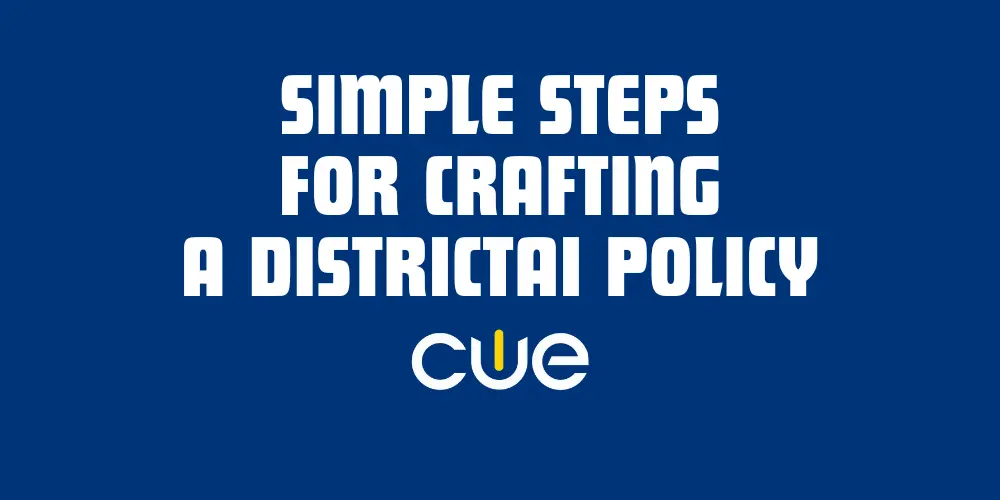
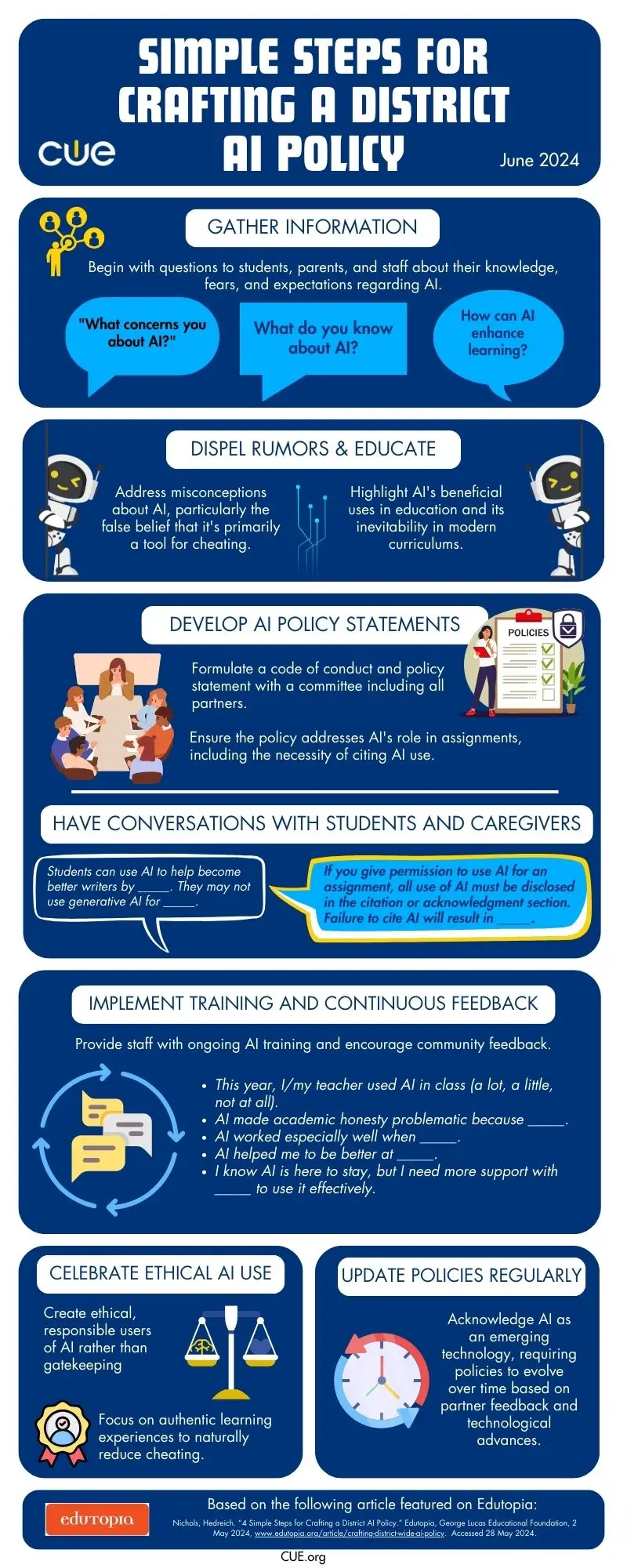
Simple Steps for Crafting a District AI Policy: How to share this infographic with school leaders

If you’ve been paying attention to how tech is transforming education this past year, you know AI is on the scene. It’s not just a buzzword anymore; it’s real, and it’s happening now. As exciting as it is, bringing AI into our schools isn’t just about flipping a switch. We need to be smart and strategic about it. Based on the Edutopia article, “4 Simple Steps for Crafting a District AI Policy,” this original CUE infographic includes tips covering everything from ethics to practical applications of AI.

Think about this infographic as a helpful conversation-starter to navigate the steps needed to develop policies in our AI world. It breaks down the complexities into manageable pieces, helping you and your leadership team understand concepts like data privacy, AI bias, and how to use these tools effectively. Feel empowered to discuss how AI has the potential to benefit everyone and align with your district’s mission and values. And feel free to remind your team that a strong and thoughtful policy will help avoid pitfalls like biased algorithms and security issues while promoting innovation.

So how can you get this information to the right people on your team? 

  • Distribute through Email: Email distribution can provide direct access to the infographic, allowing leaders to review and reflect on the content at their convenience. 

Here’s a sample AI Prompt for a related email that you can customize for your community:

  • You are an educator concerned about developing an AI policy for <your school district> but unable to draft the policy yourself. Compose an email to <your school leader> sharing an infographic that discusses simple steps to crafting a district AI policy. The email is the beginning of a conversation, so make sure the tone is <friendly, approachable, and action-oriented.> Offer to assist in the policy development and explain that you’re willing to meet to discuss this further.
  • Print Copies and Hand Them Out: Hand out printed copies of the infographic to your peers or drop it into their mailboxes. Having a printed copy of the resource on your desk can actually serve as a reminder to follow up about it and learn more.
  • Share at a Staff Meetings: Share the infographic during leadership meetings, weekly staff meetings, and professional development workshops. This opens up the floor for discussions and helps turn these ideas into action plans.

Get inspiration from these discussion stems and make them you own:

  • “A big takeaway from this infographic is how we need to think about ethical concerns, like…”
  • “To keep our district on the cutting edge with AI, we can use the tips in this infographic by…”
  • “Using the insights from this infographic in our plans, we can really boost our teaching methods by…”
  • “One key point is how we can use AI to better support our students’ learning needs, such as…”
  • “The infographic highlights the importance of involving caregivers in the AI policy process by…”

Discuss at a Personal Meeting: Make an appointment with your school leader/s and offer the infographic in advance. Making sure you both come to the meeting aware of the topic and the resource being shared increases confidence and creates a more comfortable starting place for discussion.

Find Someone to Share it on Your Behalf: Not in a position to meet with the school leaders who need this information? Seek out someone who can present it to the leadership team for you. Connecting with thought partners and advocates is a crucial step in building capacity.

You are already dialed into this important conversation by simply exploring this infographic. Now, you’re ready to spread this resource through multiple channels. Make sure you’ve done your part to ensure that everyone is prepared to use AI in a way that’s ethical, effective, and ultimately awesome for our students.

Secure Your Communication: Cybersecurity Tips for Educators

June is National Internet Safety Month

As your schedule becomes more personalized and less tethered to your school or home internet networks, it’s a good idea to take a moment and review some best practices when it comes to keeping you and your communication safe and secure. Ensuring email security is crucial to protect student information and maintain trust within the educational community. It’s also just as important to understand the basic concepts of cybersecurity. 

Here are some essential security tips and resources for educators to consider and explore as you launch into summer vacation.

CALIE
CALIE

1. Create Strong, Unique Passwords

A strong password is your first line of defense against unauthorized access. Use a combination of upper and lower case letters, numbers, and special characters. Avoid using easily guessable information, such as birthdays or common words. Consider using a password manager to generate and store unique passwords for each account securely.

PRO TIP: Use tools like www.random.org’s Random Password Generator to help keep your passwords fresh and safe. 

2. Recognize Phishing Attempts

Phishing emails attempt to trick you into revealing personal information or clicking on malicious links. Be wary of emails from unknown senders or those that create a sense of urgency. Look for red flags such as poor grammar, suspicious attachments, or links that don’t match the sender’s domain. If in doubt, verify the email’s legitimacy by contacting the sender directly through a trusted communication channel.

PRO TIP: Try your hand at practicing to identify phishing attempts through the Google Phishing Quiz powered by Jigsaw.

CALIE

3. Understand Cybersecurity and Have Fun Doing It

Cybersecurity is crucial for all users and educators in 2024 because the increasing reliance on digital tools and online platforms makes us more vulnerable to cyber threats. Protecting sensitive information, such as student data and personal details, is essential to maintain trust and privacy. Additionally, understanding cybersecurity helps educators create a safe learning environment and empowers students to navigate the digital world securely.

PRO TIP: Understand cybersecurity by playing Cyber Awareness Challenge by the US Department of Defense. This engaging, interactive game helps you navigate various scenarios, including email safety, ensuring you learn vital cybersecurity skills in an enjoyable and memorable way. 

During National Internet Safety Month, remember to take the lead and help safeguard your communication and protect the sensitive student information you handle daily. Prioritizing cybersecurity not only protects you but also fosters a safe and trustworthy educational environment for everyone involved.

Creating Classrooms That Shine with Student-Centered Learning Strategies

Creating a vibrant, student-centered learning environment is a transformative journey filled with excitement and possibility. As we consider how our learning spaces will welcome our learners back to school, let’s embrace the opportunity to reimagine our classrooms with strategies that celebrate and amplify student voice and choice while supporting each unique learner. This Edutopia video, “How to Set Up a Learner-Centered Classroom,” provides practical tips and real-world examples to help you visualize and actualize your ideas. It’s not just about setting up a space; it’s about cultivating a dynamic community where every student feels supported and inspired.

Collaborative Classroom Design

Another innovative strategy is setting up a Calming or Peace Corner—a designated space for students to retreat and self-regulate when they feel overwhelmed. This is also referred to as a Calm Corner, Reflection Station, or Mindfulness Area. Whatever you call it, make sure that this area is a positive, reflective space rather than a punitive one, allowing students to recharge and return to learning with a clear mind.  Read about Incorporating a Calming Corner Into Station Rotations for dozens of ideas to get you started. Bridging Apps even has a list of helpful apps for students to help them regulate and calm down for early elementary, upper elementary, middle school, and high school.

CALIE

Developing a Social Contract

Building a classroom community starts with establishing clear expectations. Instead of imposing rules, work with your students to create a social contract or a set of norms. This process gives them a sense of ownership and accountability. Once the contract is agreed upon and signed off by your students, display it prominently in the classroom as a constant reminder of their shared commitments.

Creating a Calming Corner

Another innovative strategy is setting up a Calming or Peace Corner—a designated space for students to retreat and self-regulate when they feel overwhelmed. This is also referred to as a Calm Corner, Reflection Station, or Mindfulness Area. Whatever you call it, make sure that this area is a positive, reflective space rather than a punitive one, allowing students to recharge and return to learning with a clear mind.  Read about Incorporating a Calming Corner Into Station Rotations for dozens of ideas to get you started. Bridging Apps even has a list of helpful apps for students to help them regulate and calm down for early elementary, upper elementary, middle school, and high school.

Routine Discussions and Active Listening

Integrating daily routines for open discussions can significantly enhance student engagement. Morning meetings, for example, provide a structured opportunity for every Two young students happily engaged in reading together, fostering a learner-centered classroom environment student to voice their thoughts and listen to others. For older students, Socratic Circles can foster deeper conversations and respectful debate, promoting critical thinking and empathy.

CALIE

Empowering Student Voices

Above all, empowering student voices and supporting every student is key to a thriving classroom environment. Sharing the floor with students and encouraging open dialogue helps them feel heard and respected. Whether you plan for this time or allow it to happen organically, we can all benefit from putting energy toward hosting discussion spaces rather than leading them. This approach not only builds their confidence but also strengthens the classroom community.

Implementing these practices can transform your classroom into a dynamic and supportive space where every student thrives. Let’s embark on this journey together, creating classrooms that are not just places of learning, but communities where joy, creativity, and connection flourish.

Beyond the Ice Breaker – 3 Innovative Back-to-School Activities to Build Classroom Community

As the new school year kicks off, we often default to launching Day 1 with traditional ice-breakers that welcome our learners back. While these are valuable and fun, one has to wonder: Could we incorporate getting-to-know-you activities that help us meet our learners in creative and imaginative ways? And can these activities play a part in the larger community-building efforts we have in place?

Here are three engaging activities that go beyond the standard icebreaker, designed to activate TK-12 student interest and foster a vibrant classroom community with both tech-infused and unplugged ideas! 

1. “Getting to Know You” with Adobe Express

Invite students to create a digital story about their 2024-2025 goals and interests using the “All About Me” Template inside Adobe Express. This activity not only invites learners to reflect on their experiences but also hones their digital literacy skills. Encourage them to mix photos, videos, and text to craft a narrative that’s uniquely theirs. By sharing these stories, students will not only learn more about each other but also begin to see the power of creativity in storytelling.

2. Collaborative Game Design with Genially

Transform your classroom into a digital game design studio for a day or two. Group students together and challenge them to design a digital board game that represents their ideal school year, topics they are passionate about right now, or current events that inspire powerful classroom conversation. Genially provides them with basic digital designs as they brainstorm game mechanics, rules, and themes. This activity fosters collaboration, creativity, and strategic thinking. Plus, it offers a playful way to discuss expectations, culture, and goals for the year.

3. Classroom Culture with an Unplugged Canvas

Using large sheets of paper, have students co-create a “Classroom Culture Canvas.” This is a visual representation of what they want their classroom community to be like. Students can add words, symbols, drawings, or photos that represent respect, creativity, inclusivity, and fun. This collaborative vision board not only builds a sense of ownership but also sets the tone for a positive and connected classroom environment.

These activities go beyond traditional ice-breakers, which can often cause anxiety and stress. Instead, they offer meaningful ways to build community and connection from the start. By fostering a welcoming and creative environment, you’re setting the stage for a year of growth, collaboration, and authentic learning experiences. Let’s make this school year the most supportive and engaging yet!

Ready to transform your classroom into a hub of creativity and connection? Don’t settle for the usual icebreakers—ignite your students’ curiosity and build a vibrant community from day one! Whether it’s crafting digital stories, designing collaborative games, or creating a shared vision for your classroom culture, these activities are designed to engage, inspire, and empower your students. Join the conversation—what innovative community-building strategies are you excited to try this year?